StepZen 101 - What is StepZen and How Does it Work
An overview of StepZen's main capabilities, including connecting to various data sources and using custom directives to create a unified GraphQL API
Episode Description
Anthony Campolo demonstrates StepZen's core capabilities by connecting mock JSON, REST, GraphQL, and MySQL database endpoints into one unified GraphQL API.
Episode Summary
In this StepZen 101 walkthrough, developer advocate Anthony Campolo builds a project from scratch that showcases the platform's ability to unify diverse data sources under a single GraphQL endpoint. He begins by setting up the project structure, including schema files, a config.yaml file for API keys, and an index.graphql file that stitches everything together. The demo progresses through four stages: first, defining mock JSON data with various GraphQL types like strings, integers, floats, and dates; second, connecting to the Cat API as a REST endpoint using the @rest directive with query variables and API key configuration; third, pulling in the Rick and Morty GraphQL API using the @graphql directive; and finally, spinning up a MySQL database on Railway, seeding it with country data, and importing it into StepZen using the @dbquery connector. The culmination is a single "mega query" that fetches data from all four sources simultaneously, illustrating StepZen's core value proposition of normalizing disparate backends into one cohesive, queryable GraphQL layer. Campolo also briefly mentions additional capabilities like @sequence and @materializer that weren't covered in the demo.
Speakers
- Anthony Campolo
Chapters
00:00:00 - Introduction and Project Setup
Anthony Campolo introduces himself and outlines the goals of the StepZen 101 session, which will walk through connecting mock JSON data, a REST endpoint, a GraphQL endpoint, and a MySQL database into a single unified GraphQL API. He explains that the demo is designed for both newcomers and those with some StepZen familiarity.
He then begins building the project from scratch, creating the folder structure with a schemas directory and an index.graphql file that stitches multiple schema files together. He emphasizes the importance of the .gitignore file for excluding the config.yaml file that holds API keys, and sets up the initial endpoint configuration with a custom domain path tied to his account.
00:04:39 - Mock JSON Data and GraphQL Types
Campolo defines the first query using plain mock JSON data without any custom directives. He walks through the core GraphQL scalar types—string, integer, float, JSON, date, and datetime—creating a test type that demonstrates each one. He deploys the endpoint and runs his first query in the GraphQL explorer, confirming that all the fields return correctly.
With the test query working, he transitions to connecting to a real REST API. He introduces the Cat API as the example, defining a breed type with fields like name, temperament, lifespan, and origin. He explains how the @rest directive configures the endpoint URL and passes query variables, and then steps off screen briefly to securely add his API key to the config.yaml file.
00:08:37 - REST API Connection and GraphQL Endpoint
After configuring the API key, Campolo returns to demonstrate a successful query against the Cat API, retrieving breed information by ID. He then moves on to connecting a GraphQL endpoint using the Rick and Morty API, highlighting how the @graphql directive only requires a single endpoint URL since GraphQL handles the rest. He defines a characters type with nested results and runs a query returning character names and images.
He pauses to point viewers toward StepZen's documentation and samples repository, noting resources for connecting to REST and GraphQL services with authentication, as well as integrations with platforms like Storyblok and Fauna. He also mentions Hacktoberfest issues available in several StepZen repositories. He then demonstrates querying all three data sources—mock JSON, the Cat API, and Rick and Morty—simultaneously through a single unified GraphQL endpoint.
00:13:50 - Setting Up a MySQL Database on Railway
Campolo shifts to the most involved part of the demo: connecting a self-hosted backend. He explains that unlike the previous examples, this requires spinning up an actual database, and introduces Railway as a quick way to provision a MySQL instance. After some initial rate-limiting issues with Railway's dashboard, he successfully creates a new project and connects via the MySQL CLI using the provided connection string.
He then creates a countries table, seeds it with data using insert statements, and verifies everything with a select query. This section illustrates how StepZen can incorporate not just third-party APIs but also databases you manage yourself, which Campolo frames as key to building full-stack applications that combine custom backends with off-the-shelf services.
00:19:05 - Database Import and the Mega Query
With the MySQL database populated, Campolo uses the StepZen import command to introspect the database and auto-generate a GraphQL schema, including the countries type and a query using the @dbquery directive. He walks through providing the host, port, database name, and credentials during the import process, and confirms the generated schema matches the data structure.
Finally, he runs the "mega query" that pulls data from all four sources—mock JSON, the Cat API, Rick and Morty, and the MySQL database—in a single request. He wraps up by summarizing the three major connector categories (REST, GraphQL, and database) and briefly mentions additional features like @sequence, @materializer, and upcoming curated APIs. He encourages viewers to explore StepZen's website, documentation, and social channels for more information.
Transcript
00:00:02 - Anthony Campolo
All right.
00:00:02 - Anthony Campolo
Hello everyone. My name is Anthony Campolo. I'm a developer advocate at StepZen, and today I'm going to be doing a StepZen 101. We're going to look at the main capabilities of StepZen, especially their custom directives and how to use each of them and combine them all into one project. So if you've never seen StepZen before, this will be a really great way to learn about it and get an idea of the wide variety of things it can do. And if you have seen StepZen before, then hopefully you'll see something that you haven't seen before. Just to give a quick overview of what we'll be doing: we're going to start with just some mock JSON data, and then we're going to connect to a REST endpoint, a GraphQL endpoint, and then we're going to spin up a database on Railway, of course, and then connect to that database with the DB query connector. So that's going to be the main outline of what we'll be doing. And if you have any questions, feel free to put them in the chat.
00:01:04 - Anthony Campolo
All right, let's get going here.
00:01:12 - Anthony Campolo
So I have a little gist here, but I'm going to end up putting this all in a repo that I can link to later if anyone is curious. First thing we're going to do is we're just going to create a blank project. I always like to do these examples starting basically from scratch so you can really get a sense of how you make a project like this. So first thing we have is just going to be a project with a single folder, and that folder is for our schema—so "schemas"—and we're going to have multiple different files that will have our different schemas for each of the different connectors we've got. And then we also have an index.graphql file that's going to be the way that we stitch all of these different files together.
00:02:11 - Anthony Campolo
And let me just do that.
00:02:15 - Anthony Campolo
That should be good. These are going to be a couple of our files. And then we're going to end up importing the MySQL stuff later, so you don't have all of that yet. But don't worry too much about this. The first couple of things we want: we always want a .gitignore, and the .gitignore is really important for a couple of reasons. This may end up becoming a project with a front end on it at some point, and you're going to want to not commit node_modules, of course, and .DS_Store is very obnoxious, so you want to get rid of that. But the important thing here really is that config.yaml, and this is what's going to hold your API keys. So it's very important that you do not commit this file. There'll be only one point in this video where I do something off screen, and that's going to be when I add an API key—that goes into my config.yaml file. The next thing that you don't need to create, but I like creating so I have more control over it right from the start, is your API endpoint. What this is going to do is deploy your own endpoint that is hosted by StepZen, and it's going to live at a domain that is based on your account name.
00:03:22 - Anthony Campolo
And then you can create whatever endpoint name you want. So it usually has some sort of thing, forward slash, and then another thing. So I just always do "api" and then whatever the name of the project
00:03:32 - Anthony Campolo
is, which is "stepzen-101."
00:03:36 - Anthony Campolo
And now this is creating the actual config.yaml file, and this is where our config is going to go. Right now it's kind of blank—we just have this configuration set here because you'll get an error when you try to run stepzen start if you just have a blank config.yaml file. And then here we have our index.graphql, and this takes all these files and just smushes them together and gives you one unified graph that you can query. Which is the main thing we're showing in this example: that you can have a very wide variety of different endpoints and things that you're pulling data from and just query it all with a simple GraphQL query. Because it's kind of the promise of GraphQL in the first place—that your front end developers can get the exact data they want when they want it. Now this is going to kick off our endpoint, but it is going to give us an error. And the reason for that is because we don't have any queries yet.
00:04:39 - Anthony Campolo
The first query we're going to define is going to use just mock JSON data. This isn't going to use any directives at all. All it's going to do is a single query that's going to return this object that we're defining here. If you know types, these should all be fairly straightforward, but just to go over them: we have string, which is like text; ints, which are integers—whole numbers like 1, 2, 3, 4, 5; and then float, which includes decimals; JSON, which is going to be like an actual JSON object that can have arrays and objects nested arbitrarily within each other; and date—so the date, what is today? October 8, 2021. And then datetime, which includes both the date and the time, 12:06 from where I'm currently standing. And then we have a query just called getTest that's going to return that test. So now this will no longer give us an error—it's going to let us know that our endpoint has been successfully deployed. And this is my little endpoint here, Pleasanton being my hometown.
00:05:59 - Anthony Campolo
And now we have all that going, we can actually test out our endpoint.
00:06:06 - Anthony Campolo
So let's open this up here and
00:06:09 - Anthony Campolo
close that, and we're just going to do a query that's going to return all the stuff. And there is all the stuff—the date, datetime, float, int, JSON thing, and then the string. So that's pretty cool. Now that we've got that going, let's actually connect to a REST endpoint. So this is an example from our docs. We're going to use the Cat API
00:06:36 - Anthony Campolo
to return a cat, because who doesn't love cats?
00:06:40 - Anthony Campolo
And the cat type is going to have an id, a name, the temperament of the cat, the lifespan, and then the origin. And then in this query we have the endpoint configuration. So this is where things really start to get interesting. Now if we have an endpoint like this, what we're doing is we basically went to the Cat API's docs, found out how to hit this endpoint, found out what we need to give it, and then how to get a breed by their id. And so we're passing in an ID variable specifically. That's GraphQL for you—you can just feed the stuff in with query variables very simply. And then we're going to configure this with our API key.
00:07:33 - Anthony Campolo
So this is where I'm going to hop off for a second.
00:07:36 - Anthony Campolo
I just saved and we're getting an error, and that's because we don't have any cat config yet, which is this. If we go over here, this is going to be our config.yaml file, and you define a configuration that is being passed in to the directive here. And when you give it your access token here.
00:08:00 - Anthony Campolo
so now I'm going to hop off sharing for a second and do that.
00:08:08 - Anthony Campolo
This is the one place where you may have some margin of error when you're doing things like this—this kind of key management stuff. But what it does is give you the ability to have your key centralized in one place, which is really nice because environment variable sprawl is a huge thing. This whole company is based around fixing environment variable sprawl. So let's go ahead and get sharing again.
00:08:37 - Anthony Campolo
Actually, let me make sure. Let me check one thing first. Okay, that's good, that's good. Okay, now we are back. Close that, close that. Good, good.
00:08:52 - Anthony Campolo
Okay, now that that's all set, I think we should be able to
00:08:57 - Anthony Campolo
run this breed query.
00:09:02 - Anthony Campolo
Now what we're going to do is run this query, we're going to do all that stuff that we already defined. And there we go—we're passing in this ID here, which identifies the specific breed, and you get back name, origin, and all that. That's how you do a REST API. Now the next thing we're going to do is a GraphQL API. This is something that's actually fairly new, and I've done a couple of streams already showing all sorts of things you can do here. So this is just going to do the Rick and Morty example right now, and if you're curious to see more, check out some of our last couple of videos. This one is kind of like a nested object, so you have a characters type, which has this results array, which then returns an array of the characters. And for this, the directive is very simple because all you're doing is feeding it a single endpoint. That's the great thing about GraphQL—you get this one endpoint that you can hit, and this is the Rick and Morty GraphQL API. So all I have to do is give it just that endpoint in the @graphql directive and everything else gets handled.
00:10:24 - Anthony Campolo
All right, now go back here.
00:10:30 - Anthony Campolo
And...
00:10:31 - Anthony Campolo
this is going to give us all
00:10:33 - Anthony Campolo
of our Rick and Morty characters, and we're getting the id, the name, and then the image.
00:10:38 - Anthony Campolo
And each image is just a string
00:10:41 - Anthony Campolo
with a JPEG in it containing our characters. If you're curious to see more of this stuff—a lot of what I'm showing is from the docs—this is our homepage, stepzen.com, and if you go over to the docs here and "connecting backends," the "Connect REST service" section goes through some of the things that I did and includes some additional steps as well. The "Connect to GraphQL API" section includes the Rick and Morty one I'm showing, and it also has things like how to authenticate with a GraphQL API as well—same thing where you pull in a config.yaml file and bring that all together so you can do your queries in a protected way. This also uses examples from Storyblok and Fauna, so we have lots of different integrations here in the docs. And then over at StepZen Samples, we also have a lot more examples as well. We've got a pretty good chunk of material now showing lots of different things you can do with the product, which I'm really excited about. And if there's anything that you see that we don't have that you think would be good to add, just let us know.
00:12:01 - Anthony Campolo
And also we've got Hacktoberfest going on. So if you check out our issues, we have a bunch of Hacktoberfest labels—same for the StepZen Nuxt and the StepZen SpaceX GraphQL repos.
00:12:17 - Anthony Campolo
Check those out if you get a chance.
00:12:23 - Anthony Campolo
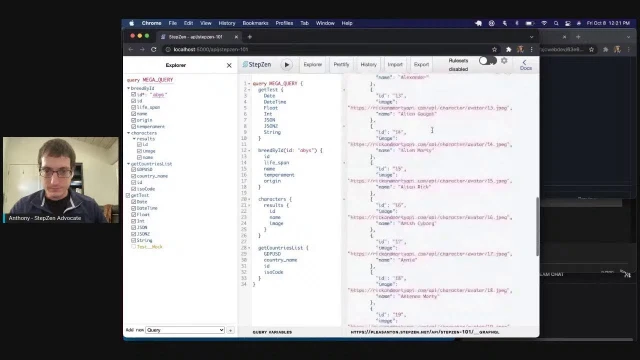
Now back to this. So far we have defined a test interface and test query, a breed type connected to a REST endpoint, and characters and character type connected to a GraphQL endpoint. And we're able to query all of them at the same time if we want. So if we go back to our pop-up here and take a look at the explorer, we're going to have all of these that we can search for.
00:13:04 - Anthony Campolo
Let me just move this over here.
00:13:08 - Anthony Campolo
If we have all of these things we can do—getTest, grab all of these, and then we can grab characters and then the cat as well. If we do all that, we can run a single query and now we're getting everything back in one result. So we're going across different types of endpoints and normalizing it into this one GraphQL endpoint for you. It's really powerful stuff in terms of getting you a huge wide range of data that you can all pull in together.
00:13:46 - Anthony Campolo
It's pretty cool.
00:13:50 - Anthony Campolo
Now that we've got all that set up, the next thing we're going to do is a database. This is where it's going to get interesting because now we actually have to host a backend that we need to connect to. So far we've been either creating our own mock data with the JSON data, or we've been using a REST endpoint or a GraphQL endpoint. And instead of doing any of that, now we're actually going to create our own endpoint that we're going to use to feed data in. And this is where I think it starts to really get interesting, because now you can see how you can combine anything you want to home-roll yourself and anything you want to pull off the shelf from a third-party service or an open-source thing, and feed it all into your project in a really unified, cohesive way. And this is what I'm really into in terms of this whole full-stack Jamstack stuff that I've been talking about for like a year now.
00:14:45 - Anthony Campolo
For anyone who listens to the Full Stack Jamstack podcast.
00:14:49 - Anthony Campolo
All right, so this is Railway. Railway is a company we've already done two streams with, and it's a great way to get a backend spun up very quickly. You can do a Postgres database, MySQL database, Mongo, or Redis instance. For this example, we're going to be using MySQL—this is going to give you a MySQL database spun up and also give you a connection string so that you can connect to it. And we're going to use a tool to import this information directly into our project. There are a couple of different ways to do this; you don't have to necessarily use the StepZen import. Whoa.
00:15:32 - Anthony Campolo
That doesn't usually happen. Let me try that again. Okay, let me—
00:15:42 - Anthony Campolo
This is my old project that I
00:15:44 - Anthony Campolo
already had set up. Let me just delete that and then try this again. All right, cool. No,
00:16:00 - Anthony Campolo
okay, so it's just rate limiting me right now. So that's fine. Let's check out what we're going to do here. We're going to create a table and then seed it, and then after that we're just going to do a select query to make
00:16:16 - Anthony Campolo
sure that all worked. Let's see.
00:16:22 - Anthony Campolo
Sometimes I usually do this from the CLI actually. So
00:16:29 - Anthony Campolo
let's see what happens if I try and right away init an empty project.
00:16:40 - Anthony Campolo
And then we can add. And then once we get that going, we'll be able to grab our connection string and connect to the project.
00:17:05 - Anthony Campolo
All right. Okay, interesting. So let's—that's fine.
00:17:15 - Anthony Campolo
Okay.
00:17:16 - Anthony Campolo
We are having some technical difficulties, folks. I'm assuming that's probably going to keep not working, so.
00:17:28 - Anthony Campolo
Yeah,
00:17:31 - Anthony Campolo
I should have kept the other one around and I could have hit that one. All right, let's change course here and
00:17:42 - Anthony Campolo
actually, let's try this one more time. If it doesn't work, then we'll change course. So if you want to see an example of this that we did in the past, you can check out—we did "Deploying Railway Applications" here, and then "Connecting to a MySQL database" over here. It looks like we got this up and running now.
00:18:10 - Anthony Campolo
All right, cool. I knew they wouldn't let me down.
00:18:12 - Anthony Campolo
Okay, now we are going to use the MySQL client to connect. One of the nice things is that once you get your database set up, you can just copy this command right here and get going. And I'm going to tear down this database after the fact, so I'm exposing my password here—but this is just going to be a quick project that we're going to tear down after the fact. And now we got that set up, we're going to run this command to create a countries table, and then we're going to insert values into it like so. And then we're going to run this select command to make sure we got the data in the database.
00:19:01 - Anthony Campolo
All right, we are up and running now.
00:19:05 - Anthony Campolo
That's all good. We're going to stop the StepZen server over here and do the import MySQL command, and it's going to ask us for a couple pieces of information. First it's going to ask us for our host. Now it's important that when you give it the host, you need to also include your port.
00:19:23 - Anthony Campolo
Don't forget—that's something I used to mess up here. So we're going to do that as
00:19:27 - Anthony Campolo
a host with the port number, and then the database name. If you're doing this on Railway, these will be the same for you.
00:19:34 - Anthony Campolo
But you can do this with any
00:19:35 - Anthony Campolo
kind of MySQL database that you want. That's going to be "railway" and then "root," and then we're going to grab the password right here. Now that's going to introspect it, generate a schema, and put it—and you can also see our data here if you want, just look at it in a nice little GUI here.
00:20:03 - Anthony Campolo
Okay, we'll just move on from that.
00:20:07 - Anthony Campolo
And now we have this mysql.graphql file, and we've got our countries type and a query. The @dbquery directive has type MySQL table and then configuration, and the configuration was also created from what we imported originally. What this basically does is run essentially the same query that we did before—like the SELECT * FROM countries—and give us back all of the data.
00:20:44 - Anthony Campolo
So let's do this query here and open this up. Okay. And make sure to start again. Okay.
00:21:01 - Anthony Campolo
And once we get that going, we're going to run getCountriesList. And there is our data from our Railway MySQL database coming through. All right, now—mega query. Now what we're going to do is run this one query that's going to be all the things, and we get all the things back. All right, so that is StepZen in a nutshell. Now there's a whole bunch of things I didn't show. There's the @sequence directive, which lets you chain queries together; there's the @materializer, which lets you link different types and objects together; and there's a bunch of other stuff, especially the curated APIs that are coming down the pipeline. But in terms of getting a mental model of what StepZen is and what you can do with it, this is, I think, a good example of the three big bucket capabilities: REST endpoint, GraphQL endpoint, and database. And we didn't show that we could also do this with Postgres instead of MySQL, or with MongoDB. And for GraphQL, you think of all the GraphQL APIs that exist now—it's just massive.
00:22:08 - Anthony Campolo
And then the whole suite of older REST APIs or new REST APIs. So essentially anything you can possibly think of, you can pull it into a StepZen project. And it's really fun to work with as well. So that is pretty much the whole presentation. If you want to find out more, you can check us out at stepzen.com, and then our Twitter is—I think—stepzen_dev. And that is also our Twitch as well, stepzen_dev. And yeah, that's me right there. All right, so that is the whole presentation. My name is Anthony Campolo, and you can check me out on Twitter and GitHub and anywhere as AJCWebDev.
00:22:56 - Anthony Campolo
Thank you so much for watching.
Discover Related Content
- Creating a Monolithic Mesh of GraphQL APIs - Builds on this intro by stitching multiple RedwoodJS GraphQL APIs into a single StepZen endpoint using the @graphql directive
- Managing Multiple Data Sources in GraphQL - Deeper demo of the same StepZen workflow connecting REST and GraphQL APIs, with more focus on API key management and backend architecture
- Building Apps with Pokemon, SpaceX, and GraphQL Studio - Showcases StepZen's GraphQL Studio UI, demonstrating @materializer and @sequence directives with real-world API combinations
- A First Look at GraphQL Helix - Explores building a custom GraphQL server from scratch, offering contrast to StepZen's directive-driven approach
- A First Look at tRPC - Examines tRPC as an alternative to GraphQL for type-safe APIs, useful context for developers evaluating StepZen