Connecting Public and Private GraphQL APIs with StepZen
Anthony Campolo demonstrates StepZen's @graphql directive by stitching together Rick and Morty, Storyblok, FaunaDB, and RedwoodJS APIs.
Episode Description
Anthony Campolo demonstrates StepZen's @graphql directive by stitching together multiple GraphQL APIs from Rick and Morty, StoryBlok, FaunaDB, and a RedwoodJS app.
Episode Summary
Anthony Campolo walks through building a unified GraphQL gateway using StepZen's @graphql directive, combining multiple data sources into a single queryable endpoint. He starts by connecting to the public Rick and Morty GraphQL API, explaining how StepZen's custom directives hook into external endpoints and how prefixing avoids name collisions when multiple APIs share common type names like "character." He then integrates StoryBlok, a headless CMS, by configuring API keys and querying blog post data alongside the Rick and Morty results. Next, he connects FaunaDB, a serverless database, demonstrating not just queries but also GraphQL mutations for creating, updating, and deleting store records. Anthony then attempts to deploy a custom GraphQL server using GraphQL Helix on AWS Lambda via the Serverless Framework, which encounters deployment errors, before pivoting to a RedwoodJS application backed by a Railway Postgres database and deployed to Netlify. By the end, he successfully queries all four data sources — Rick and Morty characters, StoryBlok posts, Fauna stores, and Redwood users — in a single unified GraphQL query, illustrating StepZen's ability to federate any combination of public, private, and custom GraphQL endpoints into one cohesive API layer.
Chapters
00:00:00 - Introduction to StepZen and the @graphql Directive
Anthony Campolo opens the stream by introducing the project: a demonstration of StepZen's @graphql directive that stitches multiple GraphQL APIs into a single gateway. He explains the broader context of schema stitching and federation in the GraphQL ecosystem, referencing a recent Learn with Jason episode that covered similar themes, and notes that this problem of combining disparate GraphQL services has existed for a long time.
He provides a high-level roadmap for the stream, outlining plans to connect a public API (Rick and Morty), private authenticated APIs (StoryBlok CMS and FaunaDB), and custom self-hosted endpoints into one unified graph. He also gives background on StepZen as a serverless GraphQL layer and briefly shares his own journey from music teacher to developer, mentioning his work with RedwoodJS.
00:03:11 - Project Setup and Rick and Morty API
Anthony walks through the initial StepZen project structure, including the schema folder convention, the config JSON for naming the endpoint, and the config YAML for storing API keys. He explains the index.graphql file's role in linking all schema files together and notes that the project needs at least one query to avoid errors on startup.
He then connects the Rick and Morty GraphQL API as the first data source, defining a simple character type with ID and name fields. He demonstrates how StepZen's @graphql directive points to an external endpoint, how the project auto-redeploys on save, and how prefixing with a value like "Rick" prevents type name collisions when multiple APIs use generic terms like "character." The first successful query returns character data from Rick and Morty.
00:09:34 - Integrating StoryBlok CMS
Anthony introduces StoryBlok, a headless CMS, and quickly sets up a new space with a sample blog post containing a title, intro, and long text. He retrieves the API key from StoryBlok's dashboard and adds it to the StepZen config YAML, then creates the corresponding schema file with types and a query that passes authentication headers through StepZen's configuration system.
After deploying, he successfully queries the StoryBlok post data and then demonstrates the real power of the approach: running a single query that returns both StoryBlok post content and Rick and Morty character data simultaneously. This moment illustrates how StepZen layers multiple data sources into one unified endpoint, showing the practical value of the @graphql directive for combining disparate APIs.
00:15:49 - Connecting FaunaDB and GraphQL Mutations
Anthony adds FaunaDB, a serverless database that comes with a built-in GraphQL API and playground. He configures the authorization headers in the config YAML and introduces mutations — the write operations of GraphQL — by creating, reading, updating, and deleting a store record in Fauna's e-commerce demo dataset.
He highlights how Fauna's built-in GraphQL playground makes it easy to test queries directly against the database before running them through StepZen. He also briefly addresses a viewer question about generating TypeScript types from GraphQL schemas, pointing to tools like GraphQL CodeGen. With Fauna integrated, the StepZen endpoint now serves data from three separate sources through a single query interface.
00:21:09 - Building a Custom GraphQL Server with Helix
Anthony shifts to creating a custom serverless GraphQL API using GraphQL Helix, a newer server implementation that keeps pace with the evolving GraphQL spec. He walks through the Express-based server setup, the handler file using the serverless-http library, and the serverless YAML configuration that defines the AWS Lambda deployment, including region, runtime, CORS settings, and webpack bundling.
He explains the concept of a "lambda-lith" — packaging an entire monolithic application into a single Lambda function — cautioning that while convenient for demos, it creates performance and cold-start issues at scale. The deployment attempt hits an error that proves difficult to debug, so Anthony decides to pivot to the RedwoodJS approach rather than spend more stream time troubleshooting the Serverless Framework configuration.
00:30:20 - Deploying a RedwoodJS API on Netlify
Anthony moves to spinning up a RedwoodJS project, explaining how Redwood auto-configures Lambda handlers and includes Prisma as an ORM for database management. He sets up a Railway Postgres database, injects the connection string as an environment variable, runs a database migration, and scaffolds a users interface where he creates sample user records.
He then deploys the Redwood app to Netlify by generating the netlify.toml configuration, pushing to GitHub, and connecting the repo through Netlify's dashboard with the database URL as an environment variable. He explains the underlying mechanics of how Netlify bundles functions using esbuild, comparing this highest-level abstraction to lower-level approaches like the Serverless Framework or raw AWS configuration.
00:40:02 - Unified Query and Wrap-Up
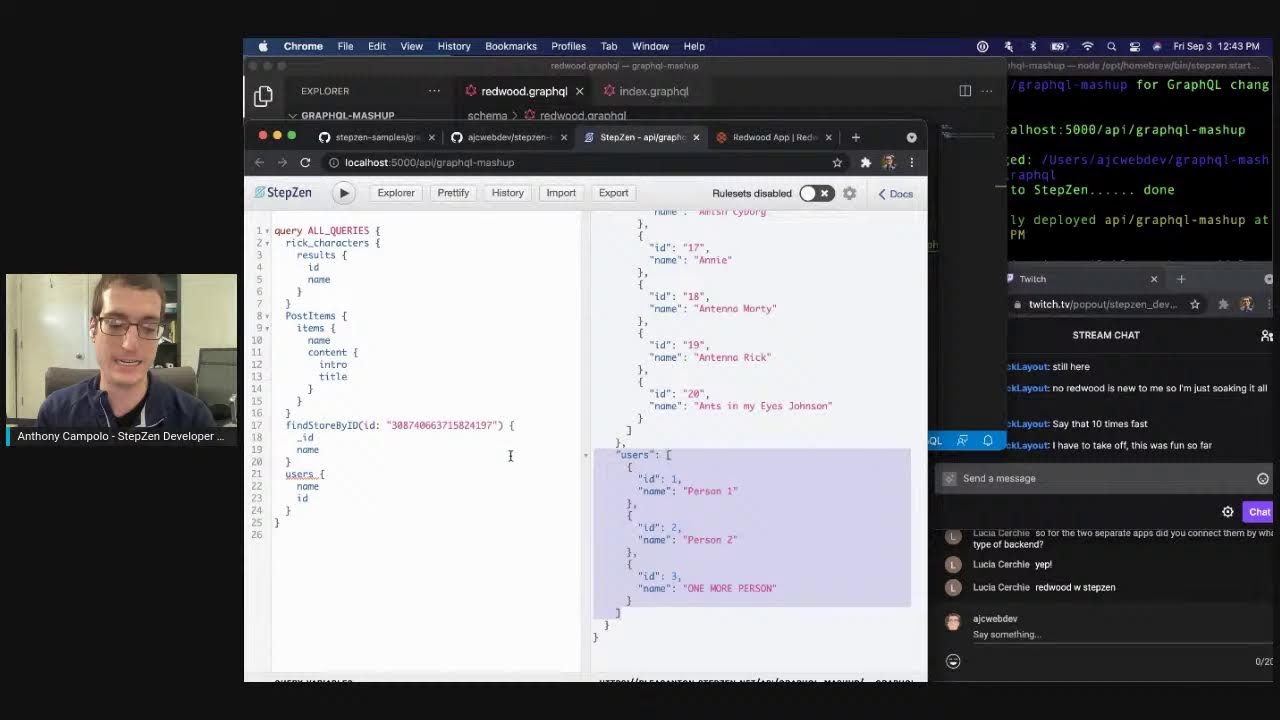
With the Netlify deployment complete, Anthony configures the Redwood endpoint in the StepZen project and addresses a cold-start delay before successfully querying the deployed users API. He then runs the culminating demonstration: a single GraphQL query that returns Rick and Morty characters, StoryBlok blog posts, Fauna store data, and Redwood user records all at once from one StepZen endpoint.
Anthony reflects on the project as the culmination of months of work, mentions a real-world testimonial from Everfund's Chris Burns who uses StepZen to unify his GraphQL endpoints, and encourages viewers to sign up at stepzen.com. He closes by inviting questions on Twitter and thanking everyone for watching the stream.
Transcript
[00:00:02.17] - Anthony Campolo Hello everyone, my name is Anthony Camp Polo. Happy to have you here. Today I'm going to be showing the steps in at GraphQL directive. So if you've watched any of these streams before, this is actually what I did maybe about a month or two ago, I kind of showed how you could use this with Redwood js. And this is going to be a much larger, more built out project with lots and lots of different GraphQL APIs. And it's going to show how it doesn't really matter how many you have. You can just take one, add to the graph, take another, add to the graph. And so this is the whole idea of being able to stitch or federate or put everything together into a gateway. There's a lot of ideas that have been kind of spinning around the GraphQL world for a long time. And if you watched yesterday's Learn with Jason episode, Carlos actually talked about this with Jason because Jason built out this thing called Gramps a long time ago. This is a problem that has existed in the GraphQL world for a long time. And I'm really excited to get to work on this tech that is super cool and does all this amazing stuff.
[00:01:14.04] - Anthony Campolo Just to give a quick overview, we're going to hit a public endpoint like the Rick and Morty, and then we're going to hit a couple private ones that are CMSs or hosted databases. And then we're going to spin up some of our own endpoints as well, and we're going to combine all those into our single graph. So if anyone is out there in
[00:01:34.28] - Anthony Campolo the chat, feel free to say hey and let me go ahead and share my screen and we can start doing this. Okay. All right, so I should have everything
[00:01:49.26] - Anthony Campolo I need so set up here. I got some, both the Twitch chat and the YouTube chat over there so everyone can see what's going on. Now this is repo that I've created and if you actually want to see where this is going, I've got another branch that's kind of the, the completed state of it. But right now all it has is a readme that's going to outline what exactly we're going to be building, building out. And if you're kind of hopping in, you have no idea what steps in is at all, then you're probably very confused. Stepzen is a serverless GraphQL layer for any data source, meaning that you can take lots of Travis and you can take like databases, REST endpoints, GraphQL endpoints. You can stitch them all together and then they also have some other directives that let you combine multiple core queries into a single query, like at sequence and things like that. I've been working for Stepzen for about six months now, and it was actually the first tech job I'd ever gotten. I was originally a music teacher. Before I did any of this, I worked on a project called RedwoodJS, and RedwoodJS uses GraphQL and that's likely going to be one of the things we're going to be using here to stitch it all together.
[00:03:11.17] - Anthony Campolo Go ahead and check us out@Stepsen.com and
[00:03:17.08] - Anthony Campolo let's just get right into this. Now, when you have a stepzen project, you are going to have just a schema folder, and you don't even necessarily need a schema folder. This is a convention that I just think is nice because it helps you separate out your base files, which are things like your config and stuff like that.
[00:03:39.02] - Anthony Campolo And so let's go ahead and just
[00:03:40.16] - Anthony Campolo do that and take a look at what we got so far.
[00:03:54.18] - Anthony Campolo All right, then we're also going to
[00:03:58.25] - Anthony Campolo create just a gitignore.
[00:04:00.28] - Anthony Campolo Always want to have a gitignore for all sorts of stuff.
[00:04:05.14] - Anthony Campolo This is just the base project right now.
[00:04:09.02] - Anthony Campolo A lot of windows going on here.
[00:04:12.08] - Anthony Campolo This is just a base project with an index graphQL and all of our schema files that we're going to use. Now, you don't need to have a stepsnd config JSON if you don't, when you spin up your endpoint, it'll ask you what you want to name your endpoint. I like to include that just so when you first run steps and start, it just goes. You don't need to answer any questions on the prompt. Then we also have this config YAML file. This is going to be eventually for our keys that we're going to use. We're going to connect to StoryBlock, which is CMS, and Fauna, which is a hosted database. That's why we have this config YAML to get API keys from them. I just have this thing here at Top Configuration Set, that's the base convention. If you don't have that, it'll give you an error saying, hey, you need this. Then the index graphql is what actually brings together all of these schema files into one big thing that's going to be queried together. If we just run this, we are still going to get an error. The reason for that is because we have all these files, we have all the schemas they're all connected together, the project set up, but we don't have any queries.
[00:05:27.05] - Anthony Campolo It's saying, hey, you get queried to do something with GraphQL and the first query we're going to do is going to be for the rick and Morty GraphQL API. I really like this example as just like a simple way to show people what GraphQL is and how it works because it gives you pretty basic schema. You have character type and then you have characters, which then returns an array of those character objects. And then they also have some relations, things like episodes and they have some filters, filtering abilities and stuff like that. But the purpose of this is more so to show how to combine all these different endpoints together. So each of these things is going to be like really, really simple type, really simple query. The idea being that we want to show the different endpoints connected together. Not so much what you can do with the queries, but it's GraphQL, so you can pretty much do whatever you want with it. So if we just do that, we get all this data back. The Star Wars API what's funny is the Star Wars API is the example from the GraphQL docs. That's the canonical GraphQL example that a lot of people use.
[00:06:36.08] - Anthony Campolo But I'm a big fan of Rick and Morty. It's a cool show.
[00:06:39.07] - Anthony Campolo Now we're going to just define the types and the things we want to get back. We don't need to do the whole schema. We have a character type with an ID name and then actually not going
[00:06:52.03] - Anthony Campolo to do that image. So we can take that off.
[00:06:56.08] - Anthony Campolo Right now I just want the ID and the name of the character.
[00:06:58.20] - Anthony Campolo That's all we want.
[00:06:59.23] - Anthony Campolo And I want to be able to get an array of characters. And we see here every time we save this redeploys because it's watching your project for changes. Now we've got our base query here. If you know anything about GraphQL. This should look pretty simple. We have a query which is a characters query that is returning characters type and then this is the stepsense ism. This is what this whole talk is about. We have these custom directives that allow us to hook into different systems. And GraphQL directive is of course for GraphQL APIs. So almost all of these, you're going to see this GraphQL on the endpoint. And that's because unlike REST APIs where you have a different endpoint for each resource, with a GraphQL endpoint, it is A single URL that you send all of your queries to. Now that we got that going, we're ready to actually run our query. And this is going to then return the characters. There we go. We're getting their ID and their name back. That's pretty cool. If we are combining multiple things together though, this will lead to a natural problem inevitably at some point, which is name collision.
[00:08:18.28] - Anthony Campolo So as Travis in the chat just mentioned, there's also the Star Wars API and there may be the Pokemon API. So if you have different APIs that are using character, because character is a very generic term, then that could be an issue. This is why we want to be able to prefix our endpoints and the way we do that is with this prefix thing here, we give it a value and then include root operations. That's related to just how steps in works with root queries and stuff. And you don't really need to worry too much about that. But if we just copy over all this, then the only thing we need to do is throw this Rick in
[00:09:03.05] - Anthony Campolo front of the queries names and we
[00:09:06.17] - Anthony Campolo should get everything back.
[00:09:10.16] - Anthony Campolo All right.
[00:09:10.29] - Anthony Campolo That's our first endpoint. So right now, as my previous coworker Brian used to say, wow, we turned a GraphQL API into a GraphQL API. Super cool, right? But this is where it really gets interesting once you start bringing in other things. Now, StoryBlock is a CMS that we actually did a stream with not too long ago, if you want to check that out.
[00:09:34.23] - Anthony Campolo Let's see, should come up.
[00:09:41.03] - Anthony Campolo We had Facundo on and learned how to actually connect to it. We did a long stream showing how to do this. I'm going to blast through it just to get us set up on storyblok.
[00:09:56.03] - Anthony Campolo You're going to storyblock.
[00:10:01.19] - Anthony Campolo You can create posts because it's a cms. So backend to connect to your posts. We already have a test space, but I'll just walk through creating a new space and see.
[00:10:16.08] - Anthony Campolo We called GraphQL Mashup and then we're going to create a folder. And then we create an entity for the entity.
[00:10:35.19] - Anthony Campolo You can select some of these pre made entities and we're going to do just a post.
[00:10:41.23] - Anthony Campolo And this is going to say this is a post here.
[00:10:47.25] - Anthony Campolo We got a nice little editor.
[00:10:49.23] - Anthony Campolo This is the title of the post. This is the intro. It's kind of short. This is the long text. It's not quite as short.
[00:11:02.08] - Anthony Campolo And then once we do that, we can publish it. There we go. Now this is published and we will be able to Connect to it with the their GraphQL API. The way we do this is we have an API key here and then all these things I'm showing, I'm going to roll these keys afterwards. This is going to be the key we need to put in our config.
[00:11:32.13] - Anthony Campolo Stepzen right here. Got a little bit ahead of myself.
[00:11:39.18] - Anthony Campolo The first thing we're going to do is we're going to create a configuration. It's going to have a name and a token. And then that token is what we grabbed over here.
[00:11:51.23] - Anthony Campolo Place it right there.
[00:11:54.29] - Anthony Campolo Then let's just take a look at this first. These are the types which is going to be post items, which is going to return the items. The items are post, post, item.
[00:12:09.13] - Anthony Campolo Sorry about that noise.
[00:12:11.06] - Anthony Campolo I'm in the noisy, noisy city of Oakland. And now we have our query which is going to return the post items. And that is going to be each
[00:12:24.15] - Anthony Campolo of the post items. Hopefully that car stops barking. There we go.
[00:12:30.02] - Anthony Campolo Okay, now we got a couple more things going on here. So we still have the same endpoint. Yeah, Right. And the Endpoint is for StoryBlock, StoryBlock, API and we have a configuration. And the configuration matches what we wrote here in our config.
[00:12:47.04] - Anthony Campolo YAML, storyblockconfig.
[00:12:49.26] - Anthony Campolo And then we're passing these headers. So if you were to just hit this API with insomnia or something like that, you would give it a header for token and then you give the token value like yarrconfig, YAML. So this is doing all that for us.
[00:13:05.24] - Anthony Campolo And let me just make sure. I'm going to delete that test one as well. Still kind of figuring out where everything is here. Here in storyblock.
[00:13:37.29] - Anthony Campolo Now we should just get back the
[00:13:39.23] - Anthony Campolo data we just created.
[00:13:43.20] - Anthony Campolo This should be good to go. I think now we're going to do this query here. And this is going to be for the post items. Return the items where you get the name. And then we're going to get the
[00:13:59.19] - Anthony Campolo content, which is the intro and the title.
[00:14:06.14] - Anthony Campolo And then
[00:14:10.17] - Anthony Campolo this actually needs to be. Deploying.
[00:14:23.13] - Anthony Campolo Great. There is our wonderful post. This is the post. This is the intro.
[00:14:28.19] - Anthony Campolo It's the title of the post.
[00:14:30.17] - Anthony Campolo Now we have both of these queries in here. If I wanted to go back to the other query I just did, and I also want to get the Rick characters. All I have to do is pop it in here then. Now we're going to get everything. We're getting the storyblock stuff and we're getting the Rick and Morty stuff. It's all within this one single Query, you just start layering them in and then you get it. That's where we really start to see the power of what we got here. Now the next thing we're going to do is we're going to pop open fauna db. FaunaDB is a serverless database. So you don't have to host your database. You don't need to provision it or anything like that. You can just spin them up really easily. And they let you create test data really easily as well. We're going to use the demo data here. The cool thing about Fauna is it comes with a GraphQL API already baked in. If we look here, we have this playground already. They also give you your authorization keys right here. This is authorization header and gave us a token.
[00:15:49.14] - Anthony Campolo You had to prefix it with basic. Here we're going to have similar thing. We're going to have faunaconfig and then the authorization basic and then you have to put your key in there.
[00:16:06.22] - Anthony Campolo That is so obnoxious. Oh my God. Okay. This is why I'm begging my girlfriend to move out of here.
[00:16:15.14] - Anthony Campolo Now we're going to do our config YAML. Now we got our configuration there and
[00:16:23.11] - Anthony Campolo then we're going to grab our key right here.
[00:16:31.17] - Anthony Campolo Now we're going to be authenticated and what we're going to show now is we're going to show mutations.
[00:16:41.14] - Anthony Campolo Is there a way to then generate TS types from that?
[00:16:45.24] - Anthony Campolo I don't know about with Stepson, but there's definitely tools from the guild and stuff like that that can generate all sorts of stuff like that. I think GraphQL CodeGen could probably do that for you.
[00:16:59.05] - Anthony Campolo If you look here, we've got this
[00:17:02.28] - Anthony Campolo kind of example where they got like schema and you got some YAML and you got some. Some types here. So there's plenty of tooling that lets you do that. And I recommend checking that out. And this may be something that we may end up bringing into steps then, just to make it kind of simple and integrated.
[00:17:19.05] - Anthony Campolo But I don't really do typescript, so not really too big of a concern for me. I know I'm still still holding out.
[00:17:31.16] - Anthony Campolo Okay, now what we're gonna do is it's like an E Commerce kind of thing. So we got store and then we got store inputs. And if we just do this. I curious actually, if they give you. I think they already give you some test data. So if we want to just find all stores, we can run that query right now.
[00:18:02.10] - Anthony Campolo Stores and then name. So we want the.
[00:18:16.25] - Anthony Campolo Name. Now we see they have some sample data for us, which is really nice. But what we're going to do is we're going to create some of our own with mutations. Now, mutations are the other half of the puzzle piece to GraphQL. We've been doing queries here so far, and queries are great. We need to read data. What if you need to write data? What if you need to update data? What if you need to delete data? Heaven forbid you have these mutations here to create a store, update a store, or delete a store. And all you gotta do is feed them the endpoint and feed them the configuration and then the mutations will work just like the queries do. And what I really like about this is it's really easy to test these out on the Fauna dashboard. So Fauna has like a GraphQL interface, just like StoryBlock has a GraphQL interface. So anything that has a GraphQL endpoint usually has some sort of place playground like we have here. So you can test those directly against your actual database and then test the same queries against your steps at endpoint. And it's really easy to see when things are working and when they're not.
[00:19:28.04] - Anthony Campolo So now we got all this set up.
[00:19:29.29] - Anthony Campolo We're going to create something called Fake Store. Team is not configured for mutations that's did not save. Okay, so now we got that.
[00:19:45.14] - Anthony Campolo We were able to actually create the Fake store and it gives you this ID here. That ID is going to be important for the next couple of things we're going to do. If we want to just return that
[00:19:57.04] - Anthony Campolo object that we just created back, then
[00:20:00.19] - Anthony Campolo we're going to do this and then we get the same thing back. Now if you want to update it, we can do that as well. Still want to grab the ID and we're going to change the name to
[00:20:11.20] - Anthony Campolo Updated fix Store and it is now updated.
[00:20:16.02] - Anthony Campolo And if we want to delete it, then we can delete it like so
[00:20:21.22] - Anthony Campolo now the store is deleted.
[00:20:24.07] - Anthony Campolo So if we then go back to try and search for it, then we'll be able to see that we're not going to have it anymore. You get an error. But I do actually want us to have a little bit of data in
[00:20:43.18] - Anthony Campolo here for when we query everything.
[00:20:50.19] - Anthony Campolo So now we got some data in there and that's the fauna stuff. Okay, now this is going to be the fun part. Now what we're going to do is we're going to actually create our own serverless GraphQL API that we're going to host and that we're going to Add in to this whole deal here.
[00:21:09.05] - Anthony Campolo Hopefully this part works.
[00:21:11.05] - Anthony Campolo This is a little bit newer and something I just figured out a couple
[00:21:14.25] - Anthony Campolo of weeks ago how to do.
[00:21:17.00] - Anthony Campolo We're going to be using GraphQL Helix here. GraphQL Helix is a much newer FQL server, so most people use Apollo Server or Express. GraphQL. Some people maybe use Mercurious, they're more into Fastify. But all of these servers have been around for a While and the GraphQL spec is actually constantly evolving. So you want to be able to include new features like the effer and stream directives and things like that. And so GraphQL Helix is actually keeping pace with the spec and giving you all the new stuff. This is really the most built out, most sophisticated GraphQL server that is around right now. What I've done so far is I've created this project here. A lot of stuff going on here. Let's walk through exactly what's going on here. First we're just going to have our app server. It's kind of like Express, so if you've used Express, this shouldn't be too scary. And we have a Express object and then we have some different GraphQL helix things we're importing for, getting the params, processing the request using the graphical editor. And then our actual GraphQL types for objects, the schema and the string. Our schema is going to be very, very basic.
[00:22:45.18] - Anthony Campolo All it's going to do is have a single query called hello, hello, query that is type string and resolves to this message here.
[00:22:53.01] - Anthony Campolo Hello from GraphQL Helix.
[00:22:55.06] - Anthony Campolo We then initialize our app with Express, make sure to do that JSON thing. And then this is going to create the GraphQL endpoint. And the thing that makes Helix nice is it abstracts at the highest level. Like what is actually happening here from, from the perspective of the request. So you have the body, the headers, the method and the query. So the body's gonna be the payload, the headers will be auth and things like that. And then the method will be. And the method, the query will be like the actual thing, the GraphQL query, the mutation or anything like that. And then you'll have a response and then it'll be on port 4000. Then we have this handler here. This is going to use the serverless HTTP library and the serverless framework. This is just a simple way of getting your, your, any server you could possibly think of into a handler. Now, it is kind of worth saying that this is not necessarily a Best practice, it's actually considered a worse practice because what you're doing is you're creating what's called a lambda lith. You're creating a single lambda that is an entire monolithic application.
[00:24:28.03] - Anthony Campolo It's cool for like hello world examples and demos and things like that, but if you're ever going to do this for a real project that needs to scale, you can't do this. It's just not going to work. It's going to hit performance issues and cold start issues and all sorts of stuff like that. What you really want to do is you're going to want to break off your project into different single responsibility functions to do stuff. But for the sake of this example, it's a pretty cool way to show how it works. What we're doing is we're importing the app and then we're initializing a handler and then basically taking the event and the context and then passing it all through. Now here we've got our serverless YAML.
[00:25:11.10] - Anthony Campolo I'm going to do one other thing too while I'm talking. It's going to take a little bit of time to do. So I want this running background serverless YAML.
[00:25:21.20] - Anthony Campolo This is what's called configuration as code. This is something that if you don't already know about, I think you're going to start hearing a lot more about this because it's just a really nice way to develop. In terms of the actual deployment step, what we're doing here is we're directly defining what is the deployment. If you've ever used AWS before, you're like, oh, I know what an AWS region is. That's where my thing is hosted. I'm on the west coast, I use US Westone. Then you can say whether it's dev or prod, you can tell it exactly which node runtime you want. And then you specify things like the allow origins for cores and methods and then you actually define the function itself, which is this handler here. So handler start, you have a handler file with start. And then we also have these plugins for webpack to actually build the function. And you can also, if you have like TypeScript, you can do that as well with this webpack configuration. Now that we got all this set
[00:26:27.22] - Anthony Campolo up, hold our fingers, this works.
[00:26:32.13] - Anthony Campolo The serverless deploy step is what's going to actually deploy it. And as soon as I see that this is not breaking, I'm going to let this run for a little bit.
[00:26:44.17] - Anthony Campolo Cool. So we got an error. Can't read property. 1 of null. Okay, interesting. Property 1 of null.
[00:27:09.11] - Anthony Campolo Files I actually need.
[00:27:11.11] - Anthony Campolo So we got that, that. We got this. Okay. This is also why I have the backup, just in case. So let me just clone this guy down real quick.
[00:27:57.24] - Anthony Campolo So.
[00:28:02.25] - Anthony Campolo You see me a bit in debugging mode right here. So let's make sure that the project
[00:28:16.06] - Anthony Campolo file is set up correctly, first of all. So we have server with package JSON,
[00:28:24.18] - Anthony Campolo webpack, config, and then we've got serverless handler src. Okay, this all looks good. So I'm going to try actually, yeah, that's all good. I'm going to try deploying from this one, see what happens. Server go to apps go to express. Serverless deployment. Oh, I gotta do edencies first, so. And then to express, See what happens. All right, still an error. Interesting. Cannot read property 1 of null. Huh? Okay, that's really strange. All right, serverless framework, let me down.
[00:30:04.29] - Anthony Campolo This is all right, because the Redwood
[00:30:07.12] - Anthony Campolo stuff kind of will show exactly what's going on with this stuff.
[00:30:10.23] - Anthony Campolo Anyway, so we're gonna head now to the Redwood portion.
[00:30:20.03] - Anthony Campolo Just go ahead and go here. This part should work just fine.
[00:30:26.22] - Anthony Campolo Now what we're going to do is we're going to spin up a Redwood project and this is also going to be your own endpoint that is being deployed and it's going to be connected to a database. So funny. Yeah, no, totally. Yeah. And it's like part of the problem here is that you have not a lot of examples and stuff with Helix is still pretty new. I took the COA example and modify it for Express and it was deploying just fine yesterday and the code is absolutely identical. Hard for me to say exactly what's
[00:31:05.25] - Anthony Campolo going on there, but for now let's just go ahead and check out this Redwood thing.
[00:31:15.15] - Anthony Campolo So if you don't know what redwood
[00:31:17.02] - Anthony Campolo is, then you're in for a treat.
[00:31:20.14] - Anthony Campolo So redwood. And then let me do one other
[00:31:23.08] - Anthony Campolo thing first, because if I don't do this first, this is going to cause an issue.
[00:31:26.23] - Anthony Campolo We're eventually going to deploy this to netlify and on netlify,
[00:31:37.08] - Anthony Campolo delete both of these first.
[00:31:42.01] - Anthony Campolo So Redwood was originally created for deployment on netlify. At this point, you can deploy it in all sorts of ways, which is pretty cool. And the thing that makes it really nice is that it actually auto configures your lambda handler. So that thing that I was just
[00:32:02.20] - Anthony Campolo trying to do with Helix should be all good.
[00:32:09.06] - Anthony Campolo It basically already has that all figured out for you. So you don't really necessarily need to have to figure out how to Actually get your thing onto a lambda function because that's kind of where this stuff gets tricky. And also it gives you a whole ORM and database as well. And the way it does that is with Prisma. Prisma is an ORM query builder kind of thing. And we are able to do migrations as well. We're going to do here
[00:32:48.02] - Anthony Campolo into Railway.
[00:32:50.23] - Anthony Campolo Railway is a really cool backend as a service kind of platform. And what they do is they give you Postgres, MySQL, Redis and MongoDB, you can spin those up really quickly. What we're going to do is we're going to create a project
[00:33:12.20] - Anthony Campolo and then
[00:33:13.05] - Anthony Campolo that project is going to have an add on. Once we initialize our project, we're going
[00:33:21.14] - Anthony Campolo to add postgres to it.
[00:33:25.12] - Anthony Campolo Then we're going to run this command which is going to inject our environment variable from our database into a our Redwood project. Then once we do that, we can run this command here that's actually going to apply the migration. This is going to set up our database with a table and then we will be able to do whatever we want with that database. This is similar to what you get from something like a Supabase. There's a lot of Postgres as a service type companies right now. Although you also get things aside from Postgres with Railway, which I like. And then you've got things like Fly. We can actually spin up a postgres container which is pretty cool. And now once you have your thing scaffold out and the generate scaffold user that's going to build out the whole Redwood dashboard essentially. And now we got our Redwood device over here.
[00:34:25.28] - Anthony Campolo And if we do this we're gonna go to users. We create very nice gender neutral person here, two and then one more person.
[00:34:45.04] - Anthony Campolo Okay, so now we got some users. Great. Now we got our users. We can actually deploy this thing to the Internet.
[00:34:55.05] - Anthony Campolo And the way we do that is
[00:34:56.17] - Anthony Campolo with this yarn Redwood setup deploy command which then creates a netlify toml over here which gives you all your build commands and whatnot. And then you just need to create
[00:35:08.08] - Anthony Campolo a repo and call this Repo steps in Redwood users.
[00:35:15.04] - Anthony Campolo Once you create that repo, you'll want to initialize your git project,
[00:35:22.12] - Anthony Campolo add it, set the origin and then push to main.
[00:35:33.08] - Anthony Campolo Once we got all that going, we can go over to Netlify here and
[00:35:38.14] - Anthony Campolo this will give us a nice easy deployment.
[00:35:43.14] - Anthony Campolo You go new site from Git GitHub
[00:35:46.24] - Anthony Campolo and then here we're going to do Redwood users.
[00:35:52.27] - Anthony Campolo Since we have that netlify toml, we have this stuff already. Then we need to give it our
[00:35:58.29] - Anthony Campolo database URL, which is what we injected in over here.
[00:36:05.28] - Anthony Campolo This is a lot of what I showed on the last stream as well,
[00:36:09.26] - Anthony Campolo if you're interested in this kind of stuff.
[00:36:12.27] - Anthony Campolo I deployed two separate Redwood apps and then merge them into one step zone
[00:36:17.12] - Anthony Campolo project, which was fun. That's going to take a little bit of time.
[00:36:24.03] - Anthony Campolo Travis, do you have questions if you're still here? We also have our cool Redwood schema over here and this is what we're going to put into our steps and project.
[00:36:52.20] - Anthony Campolo And then let's go ahead and I don't need that anymore. Two separate apps. You connect them to the back end.
[00:37:06.13] - Anthony Campolo For the. For the Redwood ones.
[00:37:08.11] - Anthony Campolo Lucia,
[00:37:11.02] - Anthony Campolo or for this one I'm doing right now. For the. Yeah, for the Redwood one. It was basically. It was like two identical Redwood apps with slightly different schemas. So both of them were connected to their own range railway database that I spun up separately. So it's a little bit silly, but at the same time it kind of shows that once you have all these tools together, you can spin up a whole full stack application that then becomes its own microservice. I called it a mesh of monolithic
[00:37:48.27] - Anthony Campolo microservices because that's what it is.
[00:37:52.15] - Anthony Campolo And you can give it any kind of back end you want. And you can connect different backends depending on what your framework and ORM is. With Redwood, it's using Prisma. Prisma is usually for relational databases, Postgres or MySQL, but they've recently added Mongo support. There's so many tools and so many different ways of doing this and different things you can stitch together. And it just comes down to what the requirements are of your app. I usually say just start with a relational db, usually postgres, and then you can kind of go off from there if you need something else. But especially since there's like so many nice postgres hosting providers now, it's just kind of like, I think the way to go. So here we have our Redwood schema now in our steps and project. So we have our user type, which just has an ID and name, and then our query, which is going to have a user's query, will return those users. All you got to do is feed in this endpoint here. Now what's happening here is netlify is giving you convention of how your functions are handled. This is basically doing the step that the serverless deploy command would do, where it takes Your function and your it bundles it and then turns it in actually what does it zips it like.
[00:39:21.20] - Anthony Campolo So there used to be this library called zip it and ship it. They're using Esbuild now instead of that you can configure one or the other, but it just takes your project turns into a zip and then puts that zip on like an S3 bucket or something like that and then lets you hit it with an endpoint probably with like API gateway or something like that. So this is all stuff you can do on AWS and you can figure out how to stitch all these services to together or you can use a slightly higher level abstraction like the serverless framework. Or you can use the highest level of abstraction right now which is netlify.
[00:39:51.14] - Anthony Campolo Although serverless cloud looks pretty cool as well.
[00:39:56.25] - Anthony Campolo So let's check back here on our
[00:39:59.29] - Anthony Campolo deploy and see how this is going.
[00:40:02.20] - Anthony Campolo Hasn't failed yet, so that's a good sign. So this is doing the thing, it's creating our functions, doing all of that.
[00:40:11.26] - Anthony Campolo This is going well so far.
[00:40:16.29] - Anthony Campolo Then what we're eventually going to do is send this one big query with everything. Let's just query the stuff we already got.
[00:40:30.27] - Anthony Campolo If we see here we have that or ID so that out
[00:40:41.16] - Anthony Campolo now we have the Rick and Morty API, we've got the storyblock CMS and then we've got our Fauna store. So this is all good. This is all still working. We're getting our Storyblock post our store
[00:40:56.03] - Anthony Campolo and we're getting our Rick and Morty characters over here. So that is all good. Now this looks like it just finished.
[00:41:08.20] - Anthony Campolo So now we got this set up. That should be it because I already have the endpoint in there.
[00:41:15.22] - Anthony Campolo So if everything went according to plan
[00:41:19.02] - Anthony Campolo I should also be able to add
[00:41:20.10] - Anthony Campolo in users, get those users back found. Okay so.
[00:41:29.15] - Anthony Campolo Oh that's because I think the.
[00:41:31.05] - Anthony Campolo The repo is slightly different. Or is it back to netlify? Where was the netlify? I had Netlify here somewhere. Okay, so see.
[00:41:52.23] - Anthony Campolo We got. I know why because I have to get to first give it the set the domain name here we got domain management. They let you give it a nice little domain name here.
[00:42:05.10] - Anthony Campolo Steps in Redwood users. Then we did that should be able to
[00:42:19.11] - Anthony Campolo as you see here is kind of thinking for a while that's the cold start in action.
[00:42:23.15] - Anthony Campolo And then there is our users.
[00:42:26.14] - Anthony Campolo Cool. So that is querying the Redwood API hosted on a netlify function which is connected to a railway database. So you see here now we're able to connect not only public GraphQL APIs, but also private authenticated GraphQL APIs and custom GraphQL APIs you spin up and deploy yourself. So essentially, anything you can do with GraphQL, you can do with the GraphQL steps and directive at this point. You can also do fragments and things like that. So it's pretty cool. This is what I've been working on for a couple months now, and this is kind of like the culmination of a lot of that work. And Dan on the team has been a huge part of that as well. And this was involved with building out the Everfund stuff. And so if you check out stepcent, everfund, you can see we have a kind of testimonial here from Chris Burns talking about how we're using Stepzen now to query all of his Everfund endpoints. And this is an example of the power of all this tech. He has his own GraphQL API thread with JS as well. And yeah, so this is kind of where we're at right now with the GraphQL directive.
[00:43:42.01] - Anthony Campolo If you want to check us out, you can just go to stepzen.com and
[00:43:47.12] - Anthony Campolo I think forward slash signup. Yep, sign up here. And yeah, that is. The whole stream almost went off without a hitch.
[00:43:59.12] - Anthony Campolo Cool. Thank you so much, everyone for watching. And yeah, feel free to hit me up on Twitter if you have questions as well. I love talking about this stuff and helping people out building. So I'm AJC Web dev everywhere on the Internet, and you also find my polywork, if you know what that is, on AJCWeb dev. All right, thanks so much, everyone.
[00:44:24.11] - Anthony Campolo Have a good day.