Architecting Fullstack Jamstack Apps with FaunaDB and RedwoodJS
Anthony Campolo explains how to use GraphQL to build a fullstack Jamstack application with FaunaDB as a serverless backend and RedwoodJS for the frontend
Episode Description
Anthony Campolo walks through building a full-stack Jamstack app using RedwoodJS, FaunaDB, and GraphQL, covering architecture, data fetching, and deployment.
Episode Summary
Anthony Campolo presents a technical walkthrough of how to architect a full-stack Jamstack application using RedwoodJS as the front-end framework and FaunaDB as the serverless database, connected through GraphQL. He begins by introducing RedwoodJS as a full-stack serverless framework, explaining its folder structure with separate web and API sides, and highlighting its concept of "cells" for declarative data fetching that handle loading, empty, failure, and success states. The core challenge he addresses is bridging the schema definition language between Redwood and Fauna, since Fauna modifies the imported schema by adding types like PostPage for pagination. He then walks through the backend services layer, showing how the GraphQL client authenticates with Fauna's API endpoint using environment variables. After covering the Redwood side, he introduces FaunaDB's query language (FQL), demonstrating how to create collections, documents, and indexes. The presentation concludes with a live demo showing the deployed application on Vercel, the Fauna dashboard, and a real-time proof of concept where he creates a new document in Fauna and immediately sees it rendered on the site, confirming the full data pipeline works end to end.
Chapters
00:00:00 - Introduction and Project Overview
Anthony Campolo introduces himself and the topic of architecting full-stack Jamstack applications using FaunaDB, RedwoodJS, and GraphQL. He shares the available resources including a GitHub repo, deployed site, and a companion article written through Fauna's Write with Fauna program, which led to this speaking engagement through their Speak with Fauna initiative.
He also highlights a forum thread documenting the collaborative process of building the project alongside another RedwoodJS contributor, David Thrysen. This thread serves as a useful resource for anyone who wants to understand the iterative development process and the challenges encountered while stitching these technologies together.
00:01:56 - RedwoodJS Architecture and Front-End Structure
Anthony explains what RedwoodJS is — a full-stack serverless framework for the Jamstack that deploys to AWS Lambda by default and distributes static files across CDNs. He introduces the core team behind Redwood and presents the architectural diagram, breaking down the separation between the web folder (front end) and the API folder (back end).
On the front-end side, he compares the structure to Create React App, walking through the public folder, source folder, and how the root component loads into the HTML. He introduces the concept of pages and shows how a simple page renders an H1 tag alongside a "post cell," which is where GraphQL data fetching begins.
00:04:35 - Cells, Declarative Data Fetching, and GraphQL Queries
Anthony explains Redwood's cell concept, a pattern for declarative data fetching where each possible state of a data request — loading, empty, failure, and success — is explicitly declared and exported. He walks through a basic GraphQL query that fetches post titles and shows how the success state uses object destructuring to extract and map over the returned data.
The return statement renders an unordered list with a list item for each post title. This section clarifies how cells serve as the bridge between the front end and the GraphQL layer, centralizing all data-fetching logic in a clean, predictable pattern that handles edge cases like errors and empty responses without additional boilerplate.
00:06:40 - Schema Definition Language and Backend Services
The discussion shifts to the backend, focusing on how Fauna's GraphQL API connects to the Redwood application. Anthony explains the schema definition language (SDL) and the challenge of synchronizing it between Redwood and Fauna, since Fauna modifies the imported schema by adding types like PostPage for pagination support, which requires adjusting the Redwood-side SDL to match.
He then walks through the services layer, showing how the GraphQL client is configured with Fauna's API endpoint and authorized using bearer token authentication with a secret key stored in environment variables. The backend logic culminates in a GraphQL handler function that combines the schema, services, and database connection into a single deployable Lambda function — all generated by default when creating a Redwood app.
00:13:11 - FaunaDB, FQL, and Database Setup
Anthony introduces FaunaDB as a global serverless database designed for low-latency access, noting that its CTO Evan Weaver drew on experience scaling Twitter. He then demonstrates Fauna's query language (FQL), which has a Lisp-like syntax of nested functions, showing how to create a collection called Post, add documents with titles, and batch-create multiple documents using map and lambda commands.
He also covers creating an index named Posts, which enables querying the collection and corresponds to the schema definition language defined earlier. Throughout this section, he emphasizes that the project was kept intentionally simple as a proof of concept, focusing on just rendering a list of post titles to demonstrate how to connect RedwoodJS and FaunaDB together.
00:17:46 - Live Demo, Deployment, and Q&A
Anthony switches to a live walkthrough, showing the GitHub repository structure and the Vercel deployment configuration. He highlights the RedwoodJS framework preset in Vercel and demonstrates how the FaunaDB secret key is stored as an encrypted environment variable. He then opens the Fauna dashboard to show the collections and indexes powering the application.
For the final proof of concept, he creates a new document directly in the Fauna dashboard, refreshes the deployed site, and the new title appears immediately — confirming the full pipeline from database to front end works in real time. He also inspects the network tab in developer tools to show the GraphQL request and response structure, including the data object with PostPage typing, before opening the floor for questions.
Transcript
00:00:00 - Anthony Campolo
Anthony's going to be kicking off architecting a full stack Jamstack application with FaunaDB, RedwoodJS and GraphQL. So I am going to pass over control to Anthony now.
00:00:22 - Anthony Campolo
All right, cool. So my name is Anthony Campolo and I'm going to be talking about architecting full stack Jamstack applications with FaunaDB, RedwoodJS and GraphQL. And I wrote an article about this. So here's kind of all the resources. There's a GitHub repo, there's the actual deployed site that I'm going to be showing you, and then the article there.
00:00:50 - Anthony Campolo
This was done through Fauna's Write with Fauna program and you can basically apply to submit any sort of article. And after I did that, they said we have a Speak with Fauna program. So I'm here with the Speak with Fauna program. I'm actually not an employee of Fauna. If they wanted to hire me, that'd be great.
00:01:10 - Anthony Campolo
But as of now I'm just speaking for them about them, kind of showing stuff I've built with Fauna.
00:01:19 - Anthony Campolo
And then if we look over here on the forum, this is a really useful resource if anyone wants to see the process that it took to kind of build this. So I went back and forth with another RedwoodJS contributor, David Thrysen, and he had done a similar type of project, I think it was with Contentful. And so as I was building out this project, he was kind of helping me out with it. We went back and forth, and if you want to see kind of what it took to get here, that's what it is. And then there's the slides there as well.
00:01:56 - Anthony Campolo
So let's just talk about first what Redwood is and then we'll talk about Fauna. Fauna is the database and Redwood is like our front end framework. So Redwood is a full stack serverless framework for the Jamstack. What this means is that it's serverless by default. So it's set up in a way where it's going to be deployed to an AWS Lambda.
00:02:23 - Anthony Campolo
I'm going to be deploying it with Vercel and it's Jamstack because it's based around the idea of having static files globally distributed across CDNs. And that's been a thing for a while for our blogs and any sort of like really front end heavy things, but with something like Fauna now we can do that with our database as well, because Fauna is also a globally distributed kind of serverless database. And we'll talk about that more once we get to the Fauna section. So Redwood is a team of four core contributors, Tom Preston-Warner, Peter Pistorius, Rob Cameron and David Price. And a quote that may or may not have been taken out of context.
00:03:13 - Anthony Campolo
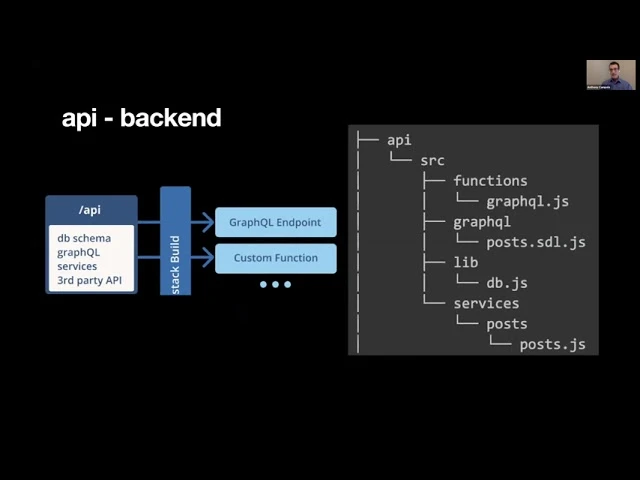
"Redwood is the best framework ever created, if not the culmination of nearly 80 years of computer programming methodologies." — Rob Cameron, RedwoodJS Core. So this is a little bit of a joke obviously, but Redwood is this really cool new type of React-based front end framework that also has a back end. This is the architectural diagram and we're going to break this down and talk about what each part means. The most important thing is what's on the left. So we have our web folder, which is our front end, and then we have our API folder, which is our back end.
00:03:50 - Anthony Campolo
So let's look at the front end first. If you've ever used Create React App, then this may look a little bit familiar. It has a public folder and a source folder, and in your source folder you have an index.html and index.js, so you're going to have a kind of root component that's going to be loaded into your HTML div like you would with most single page applications. So you have pages, and as you see here we have just an H1 tag, and then you can see that at the top — the RedwoodJS, Fauna, and then our post cell. So this is where our GraphQL query comes in.
00:04:35 - Anthony Campolo
So if we look at our post cell here, we have on the left — that's our actual query. So we're doing a query for posts and then we want to get the title of each post, and I'll talk about why that data object is there once we look at our schema definition language. But just intuitively, if you've worked with GraphQL before, this should look very familiar. It's a very basic query. And so our query is named posts, all caps.
00:05:05 - Anthony Campolo
And then below that is the actual query. And on the right, this is what makes cells kind of unique. So it's a concept introduced by Redwood and the idea is that we want to have our data fetching be declarative. So what that means is each of the different states that our data could be in, we've declared and exported here. So we have loading, we have empty, we have failure, and we have success.
00:05:34 - Anthony Campolo
So those should all make sense. Loading is if we're still waiting on the data to arrive from the server. Empty is if we ask for some data and it's just an empty array — we don't have anything in it. And then failure is if there's some sort of error, 400 or 500, and we can get it passed back through that error object. And then the success state is when you actually get the data.
00:06:00 - Anthony Campolo
So if we look at our success state, we're using object destructuring to pull out the data object from posts and then we're mapping over the data object to pull out each post title. So in the return statement we have an unordered list and inside the unordered list we're mapping over the data and then we're creating a list item for each post title. So this is where all of your front end data fetching GraphQL query stuff is happening. Now we're gonna look at the backend. So this is where we get into the stuff that connects into Fauna.
00:06:40 - Anthony Campolo
So what's really cool about Fauna is it has a GraphQL API. And so if you look at our structure here, that's going to be contained in db.js, and then we'll go through what each of these different folders is for. So this is our schema definition language. The schema definition language is what allows your front end and your back end to understand each other, to be able to speak the same language. Now this is the part that was a little tricky in terms of figuring out how to get the two to work together, because what you have to do is import your schema definition language to FaunaDB.
00:07:21 - Anthony Campolo
So what you're seeing on the left with type Post and type Query — that is what you give to Fauna. Now Fauna takes that schema definition language and they kind of add some stuff to it, and you have to figure out what they added to it so that your front end can also speak that. So once you put it into Fauna, you can look at your actual schema. That's the great thing about GraphQL — you can always see all your types. You can see exactly what you have available to you.
00:07:54 - Anthony Campolo
So even though Fauna kind of changes and adds some stuff, you can see it all. You just look at what Fauna spit out. And so on the right, this is what's actually in our Redwood project. So what Fauna changed is it added a PostPage type. And this is for pagination.
00:08:13 - Anthony Campolo
So this is where that data object came in that we had to pull out with object destructuring and then map over. The data object contains our array of posts. So you see it has the array with the Post type inside of it. So if you're not familiar with schema definition languages, you should go to howtographql.org or just the actual GraphQL website. There's a lot of great explanations for how this stuff works, but mostly what you need to know here is that we're declaring a type and then telling it what that type contains. So we have our PostPage, which has the data object with Post, and then we have our type Post, which has our title, and the title is a string.
00:09:00 - Anthony Campolo
And then we have our query which is posts, and that takes in the PostPage. So this is how your back end logic kind of works. The services layer is where you would centralize your kind of logic. This ended up being a little wonky just because of what we did with Fauna. But the main thing you want to pay attention to is we have the query itself, which is the same as it was in the cells.
00:09:34 - Anthony Campolo
So your cells and your services are speaking the same language and doing the same query, and then we're awaiting the request and giving it the Fauna GraphQL API endpoint right there. And then here is the actual query that we're doing to Fauna's GraphQL API. So there's a lot of stuff going on here. We're importing the GraphQL client, we're using the graphql-request library, which is a fairly common request library that you can use to make GraphQL requests. And then we're creating a request variable and doing an async function, and inside of that whole function we're first declaring the endpoint.
00:10:26 - Anthony Campolo
So that's graphql.fauna.com/graphql — that's the endpoint. And then we're creating our GraphQL client with the new keyword and then passing in both the endpoint and also our authorization header. So this is how you are able to authorize yourself and say I have permission to access this database. And when you create your database you can create a key, and process.env.FAUNADB_SECRET is where it's pulling out the key from your environment variables.
00:11:03 - Anthony Campolo
I'll show you that later on when we look at the Vercel deployment. But we have headers, and inside the headers you just have authorization and then bearer. All that's doing is taking bearer and then concatenating on whatever the secret key is that's inside your environment variable. And then you are doing a try/catch just to hit the endpoint. So we do GraphQL client request and then pass in the query, and then a catch if we get any sort of error.
00:11:39 - Anthony Campolo
So the query — this whole thing is what's being passed into here where we're doing the request. So in our services we're importing the request from src/lib/db and then we are using it on line 13 to make our query. So that's services importing the DB here, and then the functions. This is where all of it is sort of brought together in terms of your back end. It brings in your schema and then it brings in your services and then it finally brings in your database, and it combines all of that into a single GraphQL handler that is then deployed on AWS Lambda.
00:12:23 - Anthony Campolo
We're currently working on Azure and Google, so this will be able to be deployed to pretty much anywhere. And this is what's really fascinating about Redwood — it's serverless by default. So this comes out when you create your Redwood app. So I didn't write any of this code. You don't have to change any of this code.
00:12:46 - Anthony Campolo
This was kind of just the default that's already there. And then you select what database you want, you decide what kind of queries you want, and then you tell it what your schema definition language is. So you write all this stuff and then this is kind of the magic that pulls it all together and makes it easy to deploy with just like a one-click kind of deploy. So that's Redwood. That's the Redwood half.
00:13:11 - Anthony Campolo
Now we're going to talk about Fauna. So Fauna is a global serverless database for ubiquitous, low latency access to app data. And then here's the team that is behind Fauna. You have Eric Berg, CEO, Evan Weaver, CTO, Matt Friels, Chief Architect, and Drew Gutta, CMO. And Evan was one of the original developers who was scaling Twitter.
00:13:39 - Anthony Campolo
And a lot of what he's built with Fauna is very influenced by the scaling issues he saw with Twitter. And the idea being that he wanted to create something that could be easily used by any sort of company who's scaling up. And that's why Fauna is such a natural fit for Redwood, because they're both based around this kind of serverless, scalable by default model. So what we're gonna be looking at here is gonna be FQL. So FQL is what's called the Fauna query language.
00:14:16 - Anthony Campolo
It's a little bit like a Lisp, if you've ever used something like Scheme or Clojure — those are Lisps. And it's just functions inside of functions inside of functions inside of functions. So it's lots of parentheses and kind of chained functions. So it can be a little strange the first time you see it if you've never worked with a language like that before. But once you kind of
00:14:40 - Anthony Campolo
get the feel for it, I really like Lisps, so I think it's super cool. But I know this is a really big pain point for a lot of people who come to Fauna, so it's worth mentioning. So at the top we are doing the create collection and giving it a name. And the name is Post.
00:14:59 - Anthony Campolo
So we're creating a collection called Post. So if you've ever used something like MongoDB or other document-like databases, Fauna is similar in that you create collections and then inside the collections you have basically objects that are kind of like key-value pairs. And you can also put indexes on it for retrieval and search and things like that. So at the top we see the command, and at the bottom that's what you get back. And this is what you would see if you were using the Fauna shell.
00:15:32 - Anthony Campolo
You can use the Fauna shell from your terminal or you can go to their website. They have a really great dashboard that makes it really easy to do all the stuff, even if you're not that smooth with the terminal. So it gives you a ref. That ref is collection with posts inside. And then it gives you a timestamp, ts, and then the name.
00:15:53 - Anthony Campolo
So after you create a collection, you can put documents in there. So we're creating something like a blog post with just a title. So when I was building this, I wanted to make it as simple as possible because just connecting the two of them was gonna be fairly complicated. So this is really just a proof of concept to show how to
00:16:16 - Anthony Campolo
stitch the two together. So I just wanted to create a list of titles and then render those titles on the screen. So we're creating a title here and then at the bottom you can see it gives you all the information for that title. Then here, this is just giving you a couple more examples of what you can do with FQL. This shows you how you can
00:16:40 - Anthony Campolo
create multiple documents at once. So we're using the map command and then we're using lambda and then create collection. And if you've ever done a map function in other languages, it's the same idea. So we're mapping the post title to each of them. So we give them the post titles.
00:17:02 - Anthony Campolo
Then you want to map a post title onto each post, and then on the right you see it gives you both of those two titles that we created. And then here we're creating our index. So the index is what's going to allow us to query our posts. So we're just creating an index called Posts, so that matches up with our schema definition language that we did before. The posts contain just the title.
00:17:31 - Anthony Campolo
And then you see on the bottom we get the index and it gives you the source. So you know what collection the index goes with. Cool. So those are all the slides. So now let's take a look.
00:17:46 - Anthony Campolo
Alright, so this is the GitHub. So if you actually want to see the code, it's all in a project here — this is where you'd want to go. My GitHub is ajcwebdev and if we go to the API, we go to src and then we go to lib and db. So this was the slide I showed you where we had our Fauna secret key in process.env. And so that is being used here on Vercel.
00:18:24 - Anthony Campolo
So now this is where it is deployed. So if we go to Settings, this was the kind of one-click deploy that we have now with RedwoodJS. So you have different framework presets — things like Jekyll, Nuxt, Sapper, all those kind of things that do static site generation or other things. We now have a RedwoodJS one. So it gives you the exact build command you need and development command and it does everything for you.
00:18:56 - Anthony Campolo
And then here, if we look at our environment variables, this is our FaunaDB secret. So we got this from faunadb.com and then put it in here, and then you can see the value is encrypted. So this is the Fauna dashboard and here is the Redwood Fauna project. So as we saw before, we have our collections, which has a Post collection, and our indexes with Posts. So if we look at the collection, you see the documents, and if you look at indexes, you see the documents as well.
00:19:34 - Anthony Campolo
And this is the actual site as it's deployed. So anyone can go to this URL right here and they will see this. And just to kind of prove that this is all connected and working, we're going to go in here and we're going to create a new document. So the document is an object with a key and value. So the key is going to be title and then we're going to say "Don't Mess with Texas — $2,000 fine for littering."
00:20:06 - Anthony Campolo
And then we are going to save that here, then refresh.
00:20:15 - Anthony Campolo
And there it is. So as you saw, it was loading for a second and then it came once we had the data. Now let's take a look here in our developer tools. So this is what we got — just as we were showing, it has the UL and then each of these are list items. And then if we go to network here we can see a GraphQL request is happening here and it's status 200, type fetch, and if we open that up we go to the bottom.
00:20:49 - Anthony Campolo
This was the query we defined in our cell. It has posts in all caps and it's doing the posts query, which is pulling posts data title and then __typename: Post. And then if we look at the actual preview, here is the data object we're getting, which contains posts and then a big data object with the actual posts, and then each of them have a __typename. So the __typename is Post for each of these. And then this big data object, the __typename is PostPage — and yeah, that's the presentation.
00:21:34 - Anthony Campolo
So does anyone have any questions about that?