# A First Look at tRPC
> tRPC is a TypeScript library for building end-to-end, type-safe APIs. It creates fully typed endpoints on the backend which are queried from a frontend client.
- **Collection:** Blog post
- **Published:** 2023-03-08
- **Author:** Anthony Campolo
- **Canonical URL:** https://ajcwebdev.com/first-look-trpc/
- **Markdown URL:** https://ajcwebdev.com/first-look-trpc/index.md
- **JSON URL:** https://ajcwebdev.com/first-look-trpc/index.json
---
> ___All of this project's code can be found in the [First Look monorepo](https://github.com/ajcwebdev/a-first-look/tree/main/backend/trpc/) on my GitHub.___
## Introduction
[__tRPC__](https://trpc.io/) is a TypeScript library for building end-to-end, type-safe APIs. It creates fully typed endpoints on the backend which can be queried from a frontend written in TypeScript. While it is typically integrated with React or Next, it can be used with [__Vue__](https://github.com/michealroberts/usetrpc), [__Svelte__](https://github.com/icflorescu/trpc-sveltekit), or plain TypeScript.
The project began in [__July 2020__](https://github.com/trpc/trpc/tree/1ca033cdfc8fc4b503a055f1075c1a3903f17d54) as a proof of concept from Colin McDonnell, the creator of [__Zod__](https://github.com/colinhacks/zod). Originally called __ZodRPC__, Colin described it as "a toolkit for creating type-safe backends powered by Zod." What is Zod, you say? Glad you asked!

### Schema Validation with Zod
Zod is a TypeScript-first schema declaration and validation library that uses a "schema" to broadly refer to any data type which can be declared with static types in TypeScript. Here is how Colin described Zod when the project was first released:
> _Zod is a validation library designed for optimal developer experience. It's a TypeScript-first schema declaration library with rigorous (and correct!) inferred types, incredible developer experience, and a few killer features missing from the existing libraries._
> - _Uses TypeScript generic inference to statically infer the types of your schemas._
> - _Eliminates the need to keep static types and runtime validators in sync by hand._
> - _Has a composable, declarative API that makes it easy to define complex types concisely._
>
> ***Colin McDonnell - [Designing the perfect TypeScript schema validation library](https://colinhacks.com/essays/zod) (March 8, 2020)***
With ZodRPC, Colin hoped to build a new library that would extend the functionality of Zod to the point of offering an alternative to GraphQL. The key to the project's success would be retaining the simplicity of RPC calls which consist of only named functions that accept arguments and return values.
Colin knew ZodRPC (later renamed to tRPC) had the potential to provide a similar experience to GraphQL's end to end type-safety but without all the associated tooling and boilerplate code accompanying most GraphQL projects. Here is how he described it in ***[Building an end-to-end type-safe API without GraphQL](https://colinhacks.com/essays/painless-typesafety) (June 13, 2021)***:
> _Most people use GraphQL as a massively over-engineered way to share the __type signature__ of their API with your client. What if you could import that type signature __directly into your client__ using plain ole `import` syntax? Well... you can._
Colin didn't continue to maintain the project and essentially abandoned it. [__Alex "KATT" Johansson__](https://twitter.com/alexdotjs) then found the repo after finding a tweet by Colin with a small proof of concept containing two to three files. Alex decided to fork it rather than do his own thing since he hoped he wouldn't be alone.
Having already contributed to Blitz, the idea already resonated with the approach he was looking for, especially the data layer. Alex has been maintaining the project ever since. It has gained a large cult following in the time since Alex took over the project and his leadership has been so inextricably integral to the project that many assume that he created the project.
### Similarities and Differences with GraphQL
Throughout 2022, tRPC was increasingly pitted against GraphQL as an existential threat ironically mirroring the evangelism of GraphQL over REST over half a decade ago. I've recently been seeing lots of mea culpas and "I told you so's" on GraphQL due to the current rise of tRPC.
But I've seen reasonable takes from developers (only some of which work for GraphQL companies) who believe in the staying power of GraphQL and argue it still has unique strengths that make it a superior choice over tRPC in certain cases. This topic would require an entirely separate blog post to thoroughly analyze the disparate considerations.
In lieu of that post, I'll quickly highlight a few of the resources already available on this topic and direct the readers to those links to learn more. First and foremost, here's how my old StepZen co-worker, Roy Derks, compares the two in [***Can you compare GraphQL and tRPC? (November 27, 2022)***](https://hackteam.io/blog/compare-graphql-and-trpc/):
> _GraphQL is a query language for your API, while tRPC is a set of libraries for building end-to-end type-safe APIs. GraphQL uses HTTP as a transport layer with GraphQL queries sent as POST requests. It excels in combining multiple data sources into a single query and is often used for data modeling and architecture._
>
> _tRPC is not really meant for combining multiple data sources. It's a set of libraries that use TypeScript to ensure type safety throughout the application. Its primary purpose is making it easy to build end-to-end type-safe applications in a single codebase by using the same types in your frontend and backend._
In [***The simplicity of tRPC with the power of GraphQL (December 11, 2022)***](https://wundergraph.com/blog/trpc_vs_graphql), Jens Neuse from Wundergraph says you should consider the following context when deciding whether the strengths of GraphQL outweigh its weaknesses:
> _The great developer experience of tRPC is achieved by merging two very different concerns into one concept, API implementation and data consumption. It's important to understand that this is a trade-off. There's no free lunch. The simplicity of tRPC comes at the cost of flexibility._
>
> _With GraphQL, you have to invest a lot more into schema design, but this investment pays off the moment you have to scale your application to many but related pages. By separating API implementation from data fetching it becomes much easier to re-use the same API implementation for different use cases._
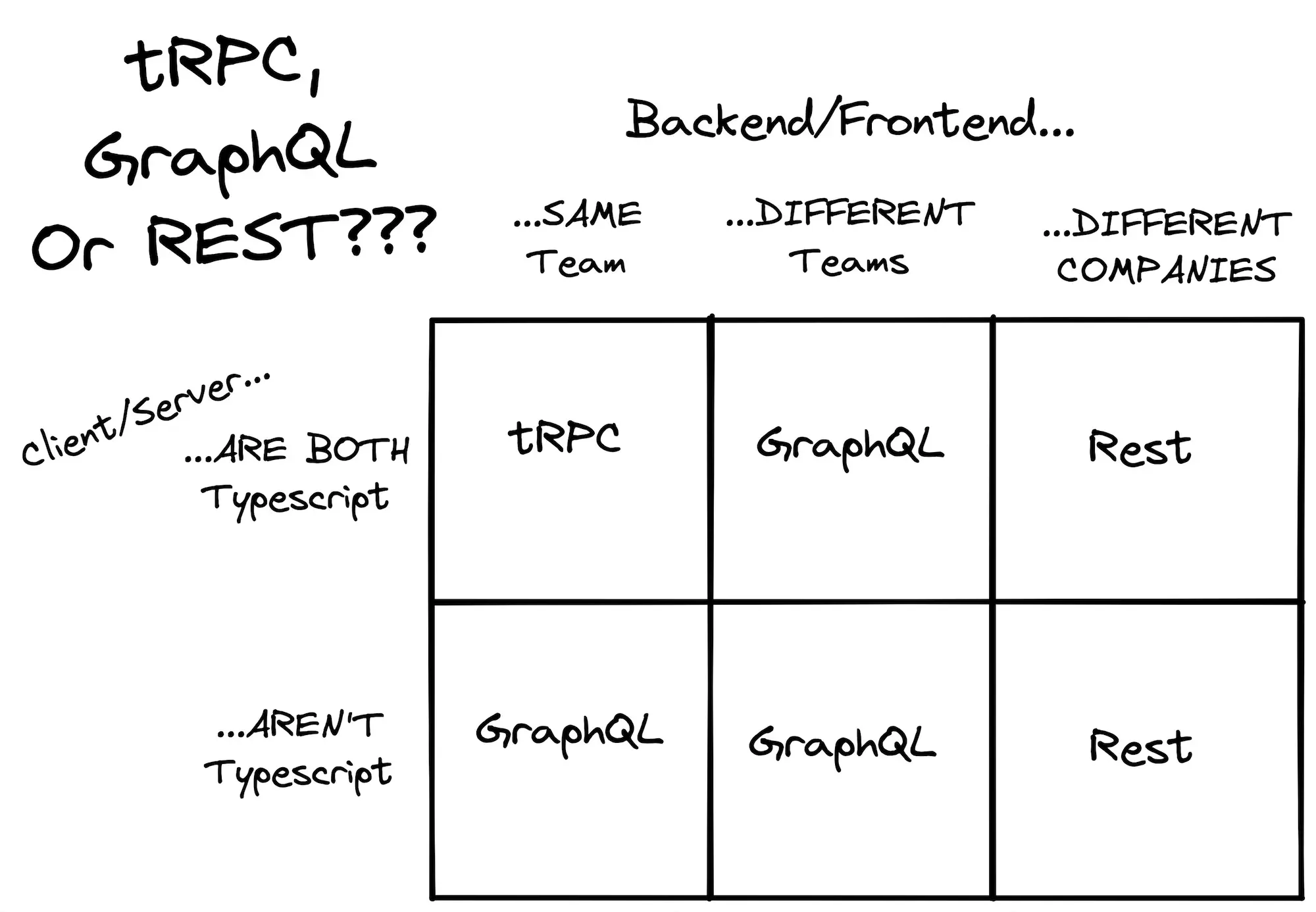
Finally, for the most thorough discussion comparing tRPC and GraphQL I'd recommend watching Theo's [GraphQL, tRPC, and REST](https://www.youtube.com/watch?v=ZfccwYUD8H0) video followed by his debate with Max Stoiber, [Discussing tRPC & GraphQL](https://www.youtube.com/watch?v=2-407yO8nEU). In the [months before this debate](https://twitter.com/t3dotgg/status/1598100163528052736/), Theo tweeted the following chart along with the message:
> tRPC is not the death of GraphQL, it just means I reach for it way less :)
## Project Setup
To begin, create a blank directory with a `.gitignore` file and initialize a `package.json` with `pnpm`.
```bash wrap=false
mkdir ajcwebdev-trpc
cd ajcwebdev-trpc
echo 'node_modules\n.DS_Store\n.env' >> .gitignore
pnpm init
```
### Configure Node and TypeScript
We'll add three scripts to our project's `package.json`. These perform the following commands:
- `dev:server` - runs the development server with `tsx`
- `build:server` - creates a bundle in `dist`
- `start:server` - runs the bundle generated in `dist`
```json wrap=false
{
"name": "ajcwebdev-trpc",
"description": "An example tRPC project",
"keywords": [ "tRPC", "Zod", "React", "Nextjs" ],
"author": "Anthony Campolo",
"license": "MIT",
"scripts": {
"dev:server": "tsx watch src/server/index.ts",
"build:server": "tsc",
"start:server": "node dist/index.js"
}
}
```
- For the server side dependencies we'll install tRPC's server implementation `@trpc/server` and `zod`.
- For development dependencies on the server we'll install `npm-run-all`, `tsx`, `typescript`, and `@types/node` for the [Node.js `DefinitelyTyped` type definitions](https://github.com/DefinitelyTyped/DefinitelyTyped).
```bash wrap=false
pnpm add @trpc/server zod superjson
pnpm add -D @types/node tsx typescript npm-run-all
```
Create a `tsconfig.json` file for your TypeScript configuration on the server.
```bash wrap=false
echo >> tsconfig.json
```
Include the following compiler options which I copy pasted from a tRPC example app and do not understand at all.
```json wrap=false
{
"compilerOptions": {
"outDir": "./dist",
"moduleResolution": "node",
"strict": true,
"lib": ["DOM", "DOM.Iterable", "ESNext"],
"module": "esnext",
"target": "esnext",
"declaration": true,
"skipLibCheck": true,
"forceConsistentCasingInFileNames": true,
"resolveJsonModule": true,
"isolatedModules": true,
"noEmit": true,
"jsx": "react-jsx"
},
"exclude": ["node_modules"],
"include": ["src", "vite.config.ts"]
}
```
### Create Project Files
For a Hello World example, we can create an entire server in a single `index.ts` file. After demonstrating how to do this, we'll break apart the server into multiple files in a structure that reflects the organization of larger, real world tRPC applications.
```bash wrap=false
mkdir src src/server
echo >> src/server/index.ts
```
Since we'll create a client application later in the tutorial, the `index.ts` server file is placed in a directory called `server` to differentiate between the two sides.
## Create HTTP Server
`initTRPC` initializes a tRPC variable `t` which can setup a request context, metadata, or runtime configuration. `createHTTPServer` is imported from the [__`standalone` adapter in `@trpc/server`__](https://github.com/trpc/trpc/blob/main/packages/server/src/adapters/standalone.ts) and used to initialize an HTTP server with Node.js.
```ts wrap=false
// src/server/index.ts
import { initTRPC } from '@trpc/server'
import { createHTTPServer } from '@trpc/server/adapters/standalone'
const t = initTRPC.create()
const router = t.router
const publicProcedure = t.procedure
const helloRouter = publicProcedure.query(
() => `hello from trpc standalone http server`
)
const appRouter = router({
hello: helloRouter
})
export type AppRouter = typeof appRouter
const { listen } = createHTTPServer({
router: appRouter
})
const PORT = 2022
console.log(`listening on localhost:${PORT}`)
listen(PORT)
```
There are adapters for other Node environments including:
- [AWS Lambda](https://trpc.io/docs/server/adapters/aws-lambda)
- [Express](https://trpc.io/docs/server/adapters/express)
- [Fastify](https://trpc.io/docs/server/adapters/fastify)
There are also a set of adapters that utilize the Fetch API including:
- [Cloudflare Workers](https://trpc.io/docs/server/adapters/fetch#cloudflare-worker)
- [Deno Deploy](https://trpc.io/docs/server/adapters/fetch#deno-deploy)
- [Next.js Edge Runtime](https://trpc.io/docs/server/adapters/fetch#nextjs-edge-runtime)
- [Vercel Edge Runtime](https://trpc.io/docs/server/adapters/fetch#vercel-edge-runtime)
### Run Node HTTP Server
Start the Node server located in `index.ts` with `tsx` in `watch` mode by running `pnpm dev:server`. The terminal should display a message saying, `listening on localhost:2022`:
```bash wrap=false
pnpm dev:server
```
With cURL, perform a `GET` request on `http://localhost:2022/hello` to receive a JSON response from the `hello` route. I included the expected output as well with a comment under the `curl` command:
```bash wrap=false
curl "http://localhost:2022/hello"
# {"result":{"data":"hello from trpc standalone http server"}}
```
As our project grows and more routes are added, it will be more maintainable to break apart pieces of the code into multiple, modular files. In the next section, we'll do just this.
### Create Context and Hello Router
A common way to structure a tRPC project includes a clear delineation between individual routes and any tRPC specific boilerplate code necessary for setting up a project with the library. Create a file called `context.ts`.
```bash wrap=false
echo >> src/server/context.ts
```
tRPC should be initialized exactly once per application with `initTRPC`. If you initialize more than one instance of tRPC you could potentially run into issues. By creating only one tRPC instance, we'll ensure that the tRPC initialization step is encapsulated.
```ts wrap=false
// src/server/context.ts
import { initTRPC } from '@trpc/server'
const t = initTRPC.create()
export const router = t.router
export const publicProcedure = t.procedure
```
After running `.create()` on `initTRPC`, we export `router` a `publicProcedure` variables but without any routes or procedures yet. Since the fundamental unit of a tRPC-based API is a router, we'll create a `routes` directory and `hello.ts` file for defining a router called `helloRouter`.
```bash wrap=false
mkdir src/server/routes
echo >> src/server/routes/hello.ts
```
A router will contain a procedure that exposes an API "endpoint." Import `publicProcedure` from `context.ts`.
```ts wrap=false
// src/server/routes/hello.ts
import { publicProcedure } from '../context'
export const helloRouter = publicProcedure.query(
() => `hello from the hello route`
)
```
Import `helloRouter` and create a `hello` route by setting `helloRouter` to `hello` in the `router` object.
```ts wrap=false
// src/server/index.ts
import { router } from './context'
import { createHTTPServer } from '@trpc/server/adapters/standalone'
import { helloRouter } from './routes/hello'
const PORT = 2022
const appRouter = router({
hello: helloRouter
})
export type AppRouter = typeof appRouter
const { listen } = createHTTPServer({
router: appRouter,
})
console.log(`listening on localhost:${PORT}`)
listen(PORT)
```
Run the cURL request again to see the new output. See comment for expected output.
```bash wrap=false
curl "http://localhost:2022/hello"
# {"result":{"data":"hello from the hello route"}}
```
### Add Input Validation with Zod
As mentioned in the introduction, Zod is a library for schema declaration and validation. It can create a "schema" that broadly refers to any data type which can be declared with static types in TypeScript. It comes with a handful of [built-in primitive types](https://zod.dev/?id=primitives) that are commonly used in TypeScript projects:
- Primitive values include `string`, `number`, `bigint`, `boolean`, `date`, and `symbol`.
- Empty types include `undefined`, `null`, and `void` which accepts `undefined`.
- `any` and `unknown` are catch-all types that allow any values.
- `never` does not allow any values.
```ts wrap=false
// src/server/routes/hello.ts
import { publicProcedure } from '../context'
import { z } from 'zod'
export const helloRouter = publicProcedure
.input(
z.string().nullish()
)
.query(({ input }) => {
return `hello from the ${input ?? 'query fallback'}`
})
```
If you were to query `http://localhost:2022/hello` again, the `data` object would contain a string with the message `hello from the query fallback`. But we can also pass an `input` to change the resulting message. Run the cURL request one more time but with a URL encoded string input to see the new output.
```bash wrap=false
curl "http://localhost:2022/hello?input=%22input%22"
# {"result":{"data":"hello from the input"}}
```
What if we wanted to validate something more complex than a single `string`? We can change `z.string` to `z.object` and specify a key-value pair where the key is `name` and the value is a `string` containing a name.
```ts wrap=false
// src/server/routes/hello.ts
import { publicProcedure } from '../context'
import { z } from 'zod'
export const helloRouter = publicProcedure
.input(
z.object({ name: z.string().nullish() })
)
.query(({ input }) => {
return {
text: `hello from ${input?.name ?? 'input fallback'}`
}
})
```
This time when you run `curl` you will receive an array containing a `result` object with the key-value pair set to `data`.
```bash wrap=false
curl "http://localhost:2022/hello?batch=1&input=%7B%220%22%3A%7B%22name%22%3A%22Next.js%20Edge%22%7D%7D"
# [{"result":{"data":{"text":"hello from Next.js Edge"}}}]
```
Since managing all the URL encoding is a huge pain, you can also use a tool like Insomnia or Postman to make HTTP requests with JSON objects as the input.
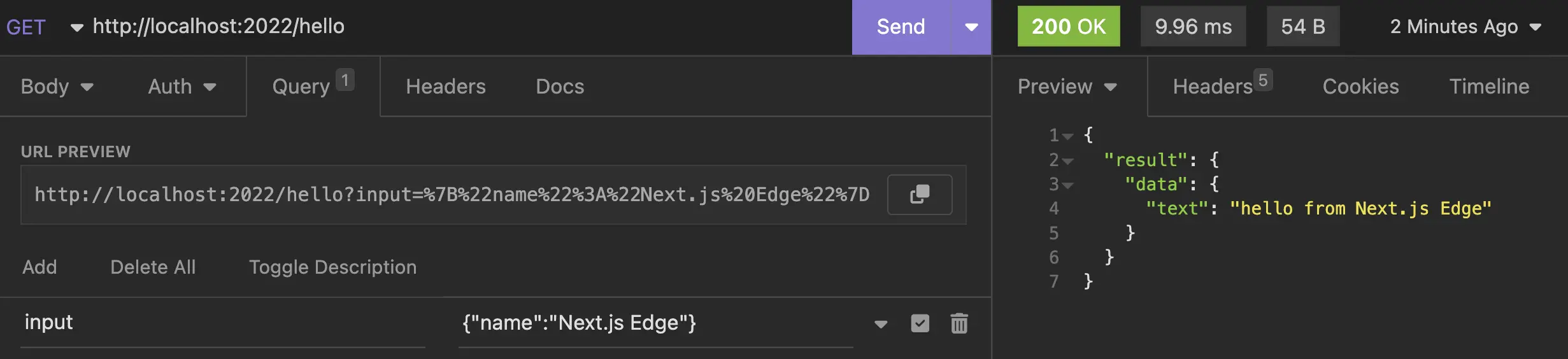
Final project structure for a standalone Node server.
```
.
├── src
│ └── server
│ ├── context.ts
│ ├── index.ts
│ └── routes
│ └── hello.ts
├── package.json
└── tsconfig.json
```
## Create React Client
Create a set of strongly-typed React hooks from your `AppRouter` type signature with `createTRPCReact`. This initializes a `trpc` client instance from `@trpc/react-query` which provides a thin wrapper over `@tanstack/react-query`.
We'll be installing the following project dependencies for the client side:
- `react` - the React core library
- `react-dom` - React's DOM rendering library
- `@trpc/client` - tRPC's client implementation
- `@trpc/react-query` - tRPC's React Query wrapper
- `@tanstack/react-query` - TanStack's React Query
For development dependencies on the client we'll be installing:
- `vite`
- `@vitejs/plugin-react`
- Types for `@types/react` and `@types/react-dom`
```bash wrap=false
pnpm add @tanstack/react-query @trpc/client @trpc/react-query react react-dom
pnpm add -D @vitejs/plugin-react vite @types/react @types/react-dom
```
Replace your current project scripts with the following:
```json wrap=false
{
"scripts": {
"dev:server": "tsx watch src/server/index.ts",
"build:server": "tsc",
"start:server": "node dist/index.js",
"dev:client": "vite",
"build:client": "tsc && vite build",
"start:client": "vite preview",
"dev": "run-p dev:*",
"build": "run-s build:server build:client",
"start": "run-p start:*"
}
}
```
Your React application, much like your tRPC application, can be organized in any fashion you prefer. For this example, I'm going to structure the files and directories like a Next.js project specifically a project using the `pages` directory. This way, we can seamlessly migrate to Next.js in the final next section.
### Configure Vite Root Component
Create a file called `_app.tsx` inside `src/pages`.
```bash wrap=false
mkdir src/pages
echo >> src/pages/_app.tsx
```
Create the following files as well:
- `vite-env.d.ts`
- `vite.config.ts`
- `index.html`
```bash wrap=false
echo '/// ' >> vite-env.d.ts
echo >> vite.config.ts
echo >> index.html
```
In the `vite.config.ts` configuration file, import `react` from `@vitejs/plugin-react` and set it to `plugins` in the `defineConfig` object.
```ts wrap=false
// vite.config.ts
import react from '@vitejs/plugin-react'
import { defineConfig } from 'vite'
export default defineConfig({
plugins: [react()]
})
```
The boilerplate HTML page imports a root component from `src/pages/_app.tsx` and renders it into a `div` element. In the next section, we'll write the code for our `_app.tsx` file.
```html wrap=false
A First Look at tRPC
```
In `_app.tsx`, we will use `createRoot` to `render` the `root` component containing the `Index` component. This root component imports and returns an HTML paragraph element from another file which represents our homepage.
```tsx wrap=false
// src/pages/_app.tsx
import { StrictMode } from 'react'
import { createRoot } from 'react-dom/client'
import Index from "./index"
createRoot(document.getElementById('root') as HTMLElement).render(
)
```
```bash wrap=false
echo >> src/pages/index.tsx
```
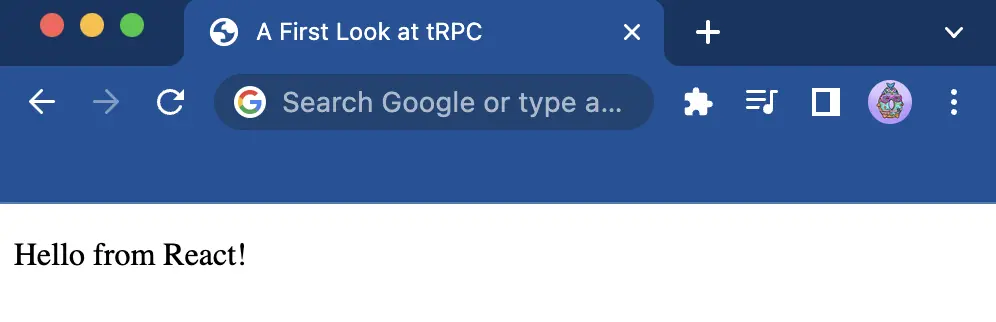
The `Index` component will return a message saying, `Hello from React!`.
```tsx wrap=false
// src/pages/index.tsx
export default function Index() {
return
Hello from React!
}
```
The server should still be running with the previous `pnpm dev:server` command. Run the following command to start up the development server for the React client.
```bash wrap=false
pnpm dev:client
```
Open [`localhost:5173`](http://localhost:5173/) to see the React app.
### Create Tanstack Query Client
Create a `components` folder and then a `Hello.tsx` component inside that folder.
```bash wrap=false
mkdir src/components
echo >> src/components/Hello.tsx
```
In `Hello.tsx`, we'll import `api` from `pages/index`, run [`useQuery`](https://tanstack.com/query/latest/docs/framework/react/reference/useQuery) on `api.hello`, and input a key-value pair with the key `name` and a value containing a string message.
```tsx wrap=false
// src/components/Hello.tsx
import { api } from "../pages/index"
export function Hello() {
const hello = api.hello.useQuery({ name: "React Query" })
// console.log(hello)
const { data, status, isSuccess, isError, error } = hello
return (
<>
Data Object
hello.data: {JSON.stringify(data)}
hello.data?.text: {JSON.stringify(data?.text)}
Status Values
hello.status: {JSON.stringify(status)}
hello.isSuccess: {JSON.stringify(isSuccess)}
hello.isError: {JSON.stringify(isError)}
hello.error: {JSON.stringify(error)}
)
}
```
For this to work we'll need to initialize the TanStack Query client in `index.tsx`. [`QueryClient`](https://tanstack.com/query/latest/docs/reference/QueryClient) is used to interact with React Query's cache and [`QueryClientProvider`](https://tanstack.com/query/latest/docs/framework/react/reference/QueryClientProvider) connects and provides `QueryClient` to the application.
[`httpBatchLink`](https://trpc.io/docs/client/links/httpBatchLink) is a terminating link that batches an array of individual tRPC operations into a single HTTP request that's sent to a single tRPC procedure. The terminating link is the last link in a link chain. Instead of calling the `next` function, the terminating link is responsible for sending your composed tRPC operation to the tRPC server and returning an `OperationResultEnvelope`.
```tsx wrap=false
// src/pages/index.tsx
import { QueryClient, QueryClientProvider } from '@tanstack/react-query'
import { createTRPCReact } from '@trpc/react-query'
import { httpBatchLink } from '@trpc/client'
import { useState } from 'react'
import type { AppRouter } from '../server'
import { Hello } from "../components/Hello"
export const api = createTRPCReact()
export default function Index() {
const [ queryClient ] = useState(() => new QueryClient())
const [ trpcClient ] = useState(() => api.createClient({
links: [
httpBatchLink({ url: 'http://localhost:2022' })
]
}))
return (
)
}
```
The `links` array added to the tRPC client config should have at least one link and that link should be a terminating link. If `links` don't have a terminating link at the end of them, the tRPC operation will not be sent to the tRPC server. At this point you'll get the following error in your browser console:
> Access to fetch at `http://localhost:2022/hello?...` from origin `http://127.0.0.1:5173` has been blocked by CORS policy. Response to preflight request doesn't pass access control check.
>
> No `Access-Control-Allow-Origin` header is present on requested resource. If an opaque response serves your needs, set request's mode to `no-cors` to fetch resource with CORS disabled.
Oh no, CORS! Don't worry, I won't make you spend the next half hour reading the [Cross-Origin Resource Sharing](https://developer.mozilla.org/en-US/docs/Web/HTTP/CORS) page on MDN for the 50th time. We'll create an HTTP handler and set the correct access headers.
### Create HTTP Handler
The `createContext()` function is called for each request and the result is propagated to all resolvers. You can use this to pass contextual data down to the resolvers.
```ts wrap=false
// src/server/index.ts
import { router } from './context'
import { createHTTPHandler } from '@trpc/server/adapters/standalone'
import { helloRouter } from './routes/hello'
import http from 'http'
const appRouter = router({
hello: helloRouter
})
export type AppRouter = typeof appRouter
const handler = createHTTPHandler({
router: appRouter
})
const server = http.createServer((req, res) => {
res.setHeader('Access-Control-Allow-Origin', '*')
res.setHeader('Access-Control-Request-Method', '*')
res.setHeader('Access-Control-Allow-Methods', 'OPTIONS, GET')
res.setHeader('Access-Control-Allow-Headers', '*')
if (req.method === 'OPTIONS') {
res.writeHead(200)
return res.end()
}
handler(req, res)
})
const PORT = 2022
server.listen(PORT, () => {
console.log(`listening on localhost:${PORT}`)
})
```
Simultaneously run the server on [`localhost:3000`](http://localhost:3000/) and the client on [`localhost:5173`](http://localhost:5173/) with `pnpm dev`.
```bash wrap=false
pnpm dev
```
Right now I'm displaying a few pieces of information contained in the `data` object that is returned by `useQuery`.
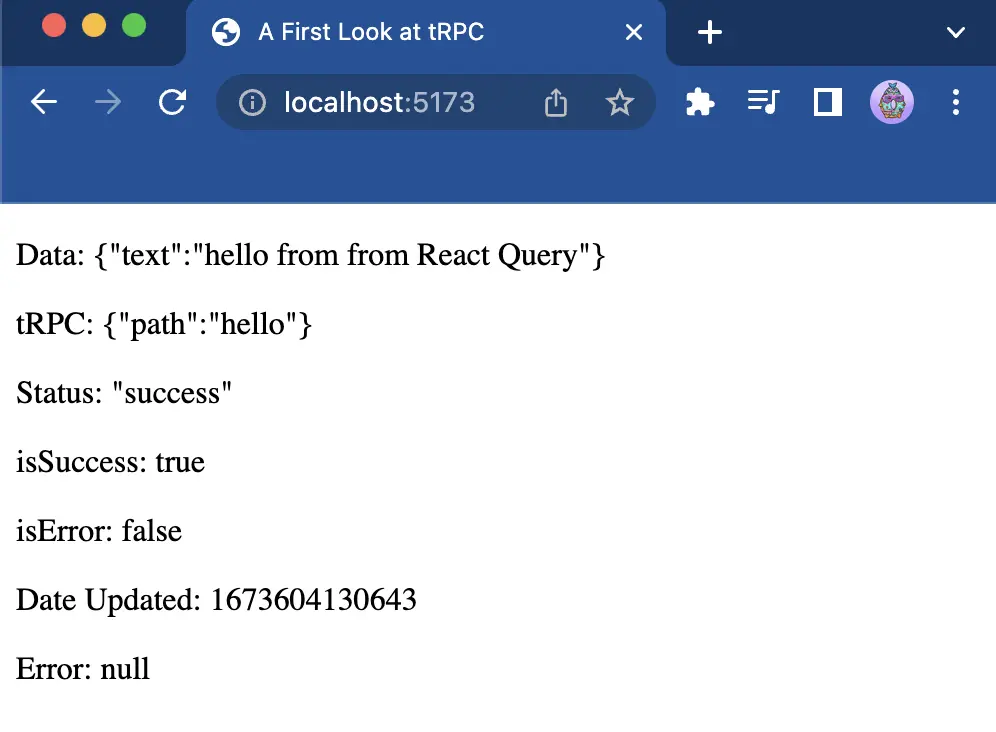
The `data` object holds a bunch of stuff you may or may not need depending on what you are querying. I'd recommend using a `console.log` on the `data` object at least once to see all the properties, but here's a few of the most common you'll likely use while getting started with tRPC.
```json wrap=false
{
"status": "success",
"fetchStatus": "idle",
"isLoading": false,
"isSuccess": true,
"isError": false,
"data": { "text": "hello from from React Query" },
"error": null,
"trpc": { "path": "hello" }
}
```
Final project structure for fullstack tRPC application with a React frontend and Node backend.
```
.
├── src
│ ├── components
│ │ └── Hello.tsx
│ ├── pages
│ │ ├── _app.tsx
│ │ └── index.tsx
│ └── server
│ ├── context.ts
│ ├── index.ts
│ └── routes
│ └── hello.ts
├── index.html
├── package.json
├── tsconfig.json
├── vite-env.d.ts
└── vite.config.ts
```
## Migrate to Next
We've now seen how to create a standalone HTTP server with tRPC and a client application that queries the server with React. Lets use Next.js to migrate our server into API routes and query them with `@trpc/next`.
### Configure Project for Next
```bash wrap=false
pnpm add @trpc/next next
```
Since Next includes a "server side" and a "client side," we no longer need separate scripts for tRPC and React. Replace the previous scripts with the following:
```json wrap=false
{
"scripts": {
"dev": "next dev",
"build": "next build",
"start": "next start"
}
}
```
Create a file called `next-env.d.ts` for Next's reference types. This file should not be edited, see the [Next.js TypeScript documentation](https://nextjs.org/docs/pages/api-reference/config/typescript) for more information.
```bash wrap=false
echo '/// \n/// ' >> next-env.d.ts
```
### Configure Vercel Edge Runtime
We no longer need to worry about managing CORS or setting headers on our responses at all since Next.js will now manage that. We can remove everything except the `appRouter` and `AppRouter` type from `src/server/index.ts` since we don't need to run the server from this file anymore.
```ts wrap=false
// src/server/index.ts
import { router } from './context'
import { helloRouter } from './routes/hello'
export const appRouter = router({
hello: helloRouter
})
export type AppRouter = typeof appRouter
```
Instead of running a standalone Node server, we'll create an API Route in the `src/pages/api` directory called `[trpc].ts`.
```bash wrap=false
mkdir src/pages/api
echo >> src/pages/api/\[trpc\].tsx
```
The `api` directory is a Next.js convention for creating a public API that executes backend JavaScript code in an isolated and fully managed environment. In this case, the code to run will be a Node function that makes a fetch request via tRPC's `fetchRequestHandler`.
```ts wrap=false
// src/pages/api/[trpc].ts
import { fetchRequestHandler } from '@trpc/server/adapters/fetch'
import { NextRequest } from 'next/server'
import { appRouter } from '../../server/index'
export default async function handler(req: NextRequest) {
return fetchRequestHandler({})
}
```
Set the `endpoint` to `/api` and the `router` to `appRouter`. In `createContext` an arrow function is run that returns an empty JavaScript object and nothing else. We also set the `runtime` to `edge` inside our `config` object because this example uses the [Next.js Edge Runtime](https://nextjs.org/docs/pages/api-reference/edge) via tRPC's fetch adapter.
```ts wrap=false
// src/pages/api/[trpc].ts
import { fetchRequestHandler } from '@trpc/server/adapters/fetch'
import { NextRequest } from 'next/server'
import { appRouter } from '../../server/index'
export default async function handler(req: NextRequest) {
return fetchRequestHandler({
endpoint: '/api',
router: appRouter,
req,
createContext: () => ({}),
})
}
export const config = {
runtime: 'edge'
}
```
Edit the `Hello.tsx` component in `src/components`.
```tsx wrap=false
// src/components/Hello.tsx
import { api } from "../pages/index"
export function Hello() {
const hello = api.hello.useQuery({ name: "Next.js Edge" })
const { data, status, isSuccess, isError, error } = hello
if (!data) {
return
Loading...
}
return (
Data Object
hello.data: {JSON.stringify(data)}
hello.data?.text: {JSON.stringify(data?.text)}
Status Values
hello.status: {JSON.stringify(status)}
hello.isSuccess: {JSON.stringify(isSuccess)}
hello.isError: {JSON.stringify(isError)}
hello.error: {JSON.stringify(error)}
)
}
```
Import `createTRPCNext` from `@trpc/next` and initialize the client to a variable called `api`. The `config` argument is a function returning an object to configure the tRPC client. The returned value includes the `links` property to customize the flow of data in tRPC between the client and server.
```tsx wrap=false
// src/pages/index.tsx
import { httpBatchLink } from '@trpc/client'
import { createTRPCNext } from '@trpc/next'
import type { AppRouter } from '../server/index'
import { Hello } from "../components/Hello"
function getBaseUrl() {
if (typeof window !== 'undefined') {
return ''
}
if (process.env.VERCEL_URL) {
return `https://${process.env.VERCEL_URL}`
}
return `http://localhost:${process.env.PORT ?? 3000}`
}
export const api = createTRPCNext({
config() {
return {
links: [ httpBatchLink({ url: getBaseUrl() + '/api' }) ]
}
},
ssr: false
})
export default function Index() {
return (
<>
)
}
```
Lastly, import `api` from `src/pages/index.tsx` and pass `MyApp` to the `withTRPC()` higher-order component.
```tsx wrap=false
// src/pages/_app.tsx
import type { AppType } from 'next/app'
import { api } from './index'
const MyApp: AppType = ({ Component, pageProps }) => {
return
}
export default api.withTRPC(MyApp)
```
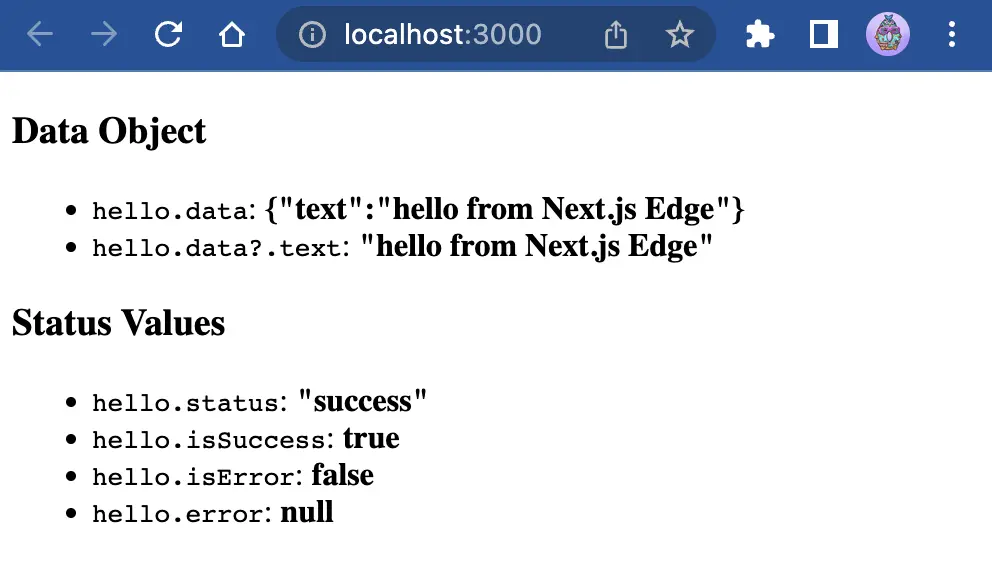
Open [`localhost:3000`](http://localhost:3000/).
### Deploy to Vercel
TypeScript decided to [yuck my yum](https://www.urbandictionary.com/define.php?term=Yuck%20my%20yums.) at the last minute and gave the following error:
> Type error: The inferred type of `api` cannot be named without a reference to `.pnpm/@trpc+react-query@10.14.1_ldv44zvqpibs4fctxfwnszfeji/node_modules/@trpc/react-query/shared`. This is likely not portable. A type annotation is necessary.
This blog post is already long enough so instead of doing the responsible thing and fixing this error I'm going to [turn off TypeScript build errors](https://nextjs.org/docs/pages/api-reference/config/next-config-js/typescript) with a `next.config.js` file.
```bash wrap=false
echo >> next.config.js
```
Set `ignoreBuildErrors` to `true` and prepare an apology tweet for the thousands of developers you just infuriated.
```js wrap=false
// next.config.js
module.exports = {
typescript: {
ignoreBuildErrors: true,
},
}
```
Install the `vercel` CLI as a project dependency and build your project's output. Then deploy to staging with the `--prebuilt` option and finally deploy to production with the `--prod` option.
```bash wrap=false
pnpm add -D vercel
pnpm vercel build
pnpm vercel --prebuilt
pnpm vercel deploy --prod
```
Open `ajcwebdev-trpc.vercel.app` to see your deployed app and run the following curl command to send a request to your `api` handler. If you followed along correctly and everything worked as intended you should get the commented output:
```bash wrap=false
curl "https://ajcwebdev-trpc.vercel.app/api/hello?batch=1&input=%7B%220%22%3A%7B%22name%22%3A%22Next.js%20Edge%22%7D%7D"
# [{"result":{"data":{"text":"hello from Next.js Edge"}}}]
```