# A First Look at Slinkity
> Slinkity is a frontend component framework that uses Vite to bring dynamic, client side interactions to your static Eleventy sites.
- **Collection:** Blog post
- **Published:** 2021-08-08
- **Author:** Anthony Campolo
- **Canonical URL:** https://ajcwebdev.com/first-look-slinkity/
- **Markdown URL:** https://ajcwebdev.com/first-look-slinkity/index.md
- **JSON URL:** https://ajcwebdev.com/first-look-slinkity/index.json
---
> ___All of this project's code can be found in the [First Look monorepo](https://github.com/ajcwebdev/a-first-look/tree/main/frontend/slinkity/) on my GitHub.___
## Introduction
Slinkity is a framework that uses Vite to bring dynamic, client side interactions to your static 11ty sites. It was announced by [Ben Holmes](https://twitter.com/BHolmesDev) with a Tweet on [June 14, 2021](https://twitter.com/BHolmesDev/status/1404426841440538627) and released as an alpha version on [August 8, 2021](https://www.npmjs.com/package/slinkity). It enables turning existing `.html` or `.liquid` files into `.jsx` files.
Slinkity allows you to insert components into pages with shortcodes such as, `{% react './path/to/Hello.jsx' %}`. Because component-driven pages are hydrated on the client, dynamic state management works in both development and production. It aims to unify two competing camps in the current web development community:
* Lean, JavaScript-free static site generators driven by data and templating languages like Jekyll and Hugo.
* Dynamic, JavaScript-heavy web apps powered by data and React or Vue components like NextJS and NuxtJS.
Slinkity is in early alpha and not recommended for production use. You can [report issues or log bugs on GitHub](https://github.com/slinkity/slinkity/issues).
## 1- Create Project
Start by making a new directory with an `index.md` file containing a header and a `.gitignore` file.
```bash wrap=false
mkdir -p ajcwebdev-slinkity/src
cd ajcwebdev-slinkity
echo '# ajcwebdev-slinkity' > src/index.md
echo 'node_modules\n_site\n.DS_Store' > .gitignore
```
### Add Slinkity dependency
Initialize a `package.json` file and install Slinkity as a development dependency. You will also need to install `react` and `react-dom` as dependencies.
```bash wrap=false
yarn init -y
yarn add -D slinkity @11ty/eleventy@beta
yarn add react react-dom
```
Slinkity relies on 11ty [1.0](https://www.11ty.dev/blog/eleventy-one-point-oh/) to work properly.
### eleventy-js
Create an 11ty configuration file.
```bash wrap=false
touch .eleventy.js
```
Set the input directory to `src`.
```js wrap=false
// .eleventy.js
module.exports = function (eleventyConfig) {
return {
dir: {
input: 'src',
},
}
}
```
### Start development server
`npx slinkity --serve` starts [a Vite server](https://vite.dev/guide/#index-html-and-project-root) pointed at your 11ty build.
```bash wrap=false
npx slinkity --serve
```
The `--incremental` flag can be used for faster builds during development. Vite enables processing a range of file types including SASS and React.
```
[Browsersync] Access URLs:
-----------------------------------
Local: http://localhost:8080
External: http://192.168.1.242:8080
-----------------------------------
[Browsersync] Serving files from: _site
[11ty] Writing _site/index.html from ./src/index.md (liquid)
[11ty] Copied 1 file / Wrote 1 file in 0.11 seconds (v1.0.0-beta.2)
[11ty] Watching…
```
Open [localhost:8080](http://localhost:8080/) to view your site.

When using the `slinkity` command, all arguments are passed directly to the `eleventy` CLI except `serve` and `port`:
* `serve` starts the [11ty dev server in `--watch` mode](https://www.11ty.dev/docs/usage/#re-run-eleventy-when-you-save) to listen for file changes.
* Slinkity spins up an independent Vite server instead of 11ty's Browsersync server. `port` is for our own server which needs to be picked up and passed to Vite.
The CLI checks for Eleventy configs and will look for any custom directories returned such as input or output. If found, those are passed off to the Vite server so it can look in the right place.
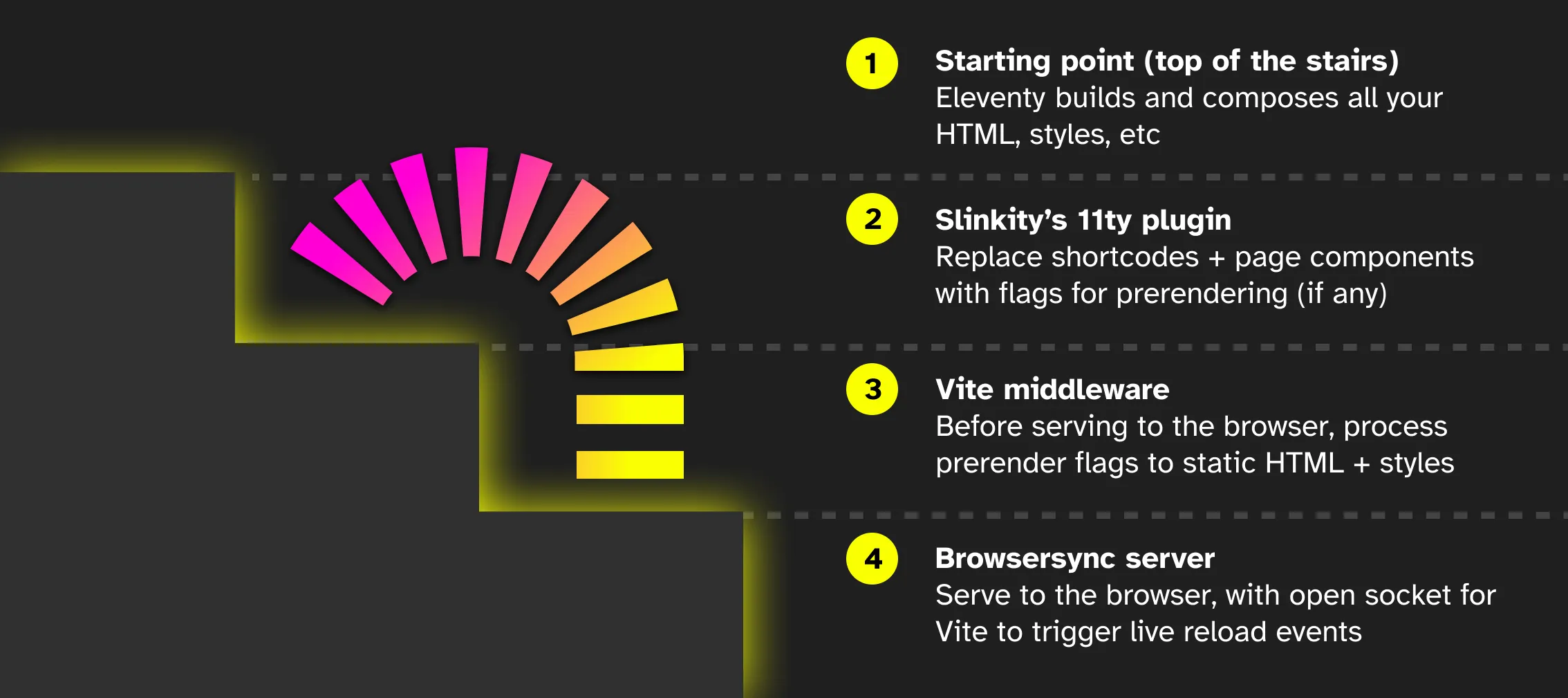
We start 2 dev servers in parallel:
* An Eleventy server to build your templates and watch for file changes
* A Vite server for resource bundling and debugging in your browser
The Vite server starts by pointing to your Eleventy output directory. If that directory doesn't exist yet, Vite waits for the directory to get written.
## 2- Add React Components
We have our 11ty project up and running. We will now create a `jsx` component and include it on our index page with a shortcode.
### Hello-jsx
Your components will be included in a directory called `components` inside 11ty's [`_includes`](https://www.11ty.dev/docs/config/#directory-for-includes) directory.
```bash wrap=false
mkdir -p src/_includes/components
touch src/_includes/components/Hello.jsx
```
This is where all your imported components should live. Slinkity will always copy the contents of `_includes/components/` to the build for Vite to pick up. If you place your components anywhere outside of here, Vite won't be able to find them!
```jsx wrap=false
// src/_includes/components/Hello.jsx
import React from "react"
const Hello = () => {
return (
<>
The quality or condition of a slinky
)
}
export default Hello
```
This component returns some text contained in `span` tags. With the `react` [shortcode](https://www.11ty.dev/docs/shortcodes/), you can insert components into any static template that 11ty supports. Include `react` shortcode in `index.md` and pass the path to your component, in this case `components/Hello`.
```markdown
# ajcwebdev-slinkity
{% react 'components/Hello' %}
```
`_includes` and `.jsx` are optional in our shortcode.

### Counter-jsx
Like the previous component, the file must be under `_includes/components` so Slinkity can copy this directory over to your build.
```bash wrap=false
touch src/_includes/components/Counter.jsx
```
Declare a new state variable called `count`.
```jsx wrap=false
// src/_includes/components/Counter.jsx
import React, { useState } from 'react'
function Counter() {
const [count, setCount] = useState(0)
return (
You've had {count} glasses of water 💧
)
}
export default Counter
```
Include the component with a shortcode like the previous one.
```md
# ajcwebdev-slinkity
{% react 'components/Hello' %}
{% react 'components/Counter' %}
```
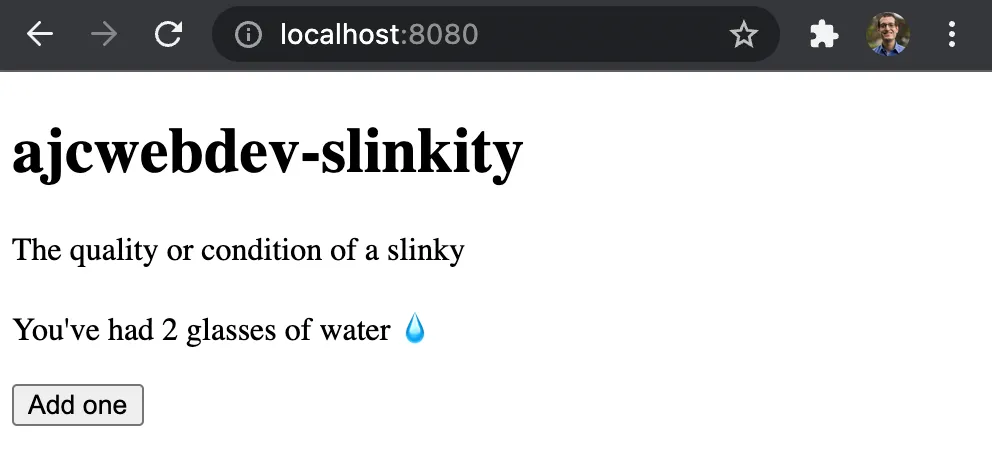
This will find `_includes/component/Counter.jsx`, statically render the component, insert it as HTML, and hydrate the HTML rendered with our JavaScript component.
## 3- Create a component page
Component pages are like any other template on your 11ty site. Templates are the files that define your contents. In a blog, for instance, this could be the Markdown file that contains your blogpost.
### about-jsx
Say we wanted to create an `/about` page with an interactive image carousel. We can create an `about.jsx` file alongside the other pages on our site.
```bash wrap=false
touch src/about.jsx
```
You will receive an error message that `about.jsx` doesn't export anything. Add the following:
```jsx wrap=false
// src/about.jsx
import React from 'react'
function About() {
return (
This page tells you stuff about things!
)
}
export default About
```
Open `/about/` to see the page. You will need to include that trailing slash `/` for our Vite server to find the page. This is because our JS bundle lives on `/about`, which trips up the Vite development server.

## 4- Layouts
Slinkity is wrapping our component with some `html` and `body` tags automatically. However, if we have metadata or extra wrapper elements to include, it is useful to create a layout template. You can learn more about [layout chaining in the 11ty docs](https://www.11ty.dev/docs/layouts/).
### Applying front matter
If you're familiar with 11ty, you've likely worked with front matter before. Front matter works the same way for component-based pages as it does for 11ty. You can think of front matter as a way to pass information "upstream" for other templates to read from.
```jsx wrap=false
// src/about.jsx
import React from 'react'
export const frontMatter = {
title: 'About me'
}
function About() {
return (
This page tells you stuff about things!
)
}
export default About
```
This `title` key is now accessible from any layout templates applied to our page. See [11ty's front matter documentation](https://www.11ty.dev/docs/data-frontmatter/) for more on how the data cascade fits into this.
### layout-html
Create a `layout.html` under `_includes` directory
```bash wrap=false
touch src/_includes/layout.html
```
Populate `layout.html` with content.
```html wrap=false
{{ title }}
{{ content }}
```
1. `{{ title }}` uses the "title" attribute from our page's front matter
2. `{{ content }}` renders our component page
Include `frontMatter` in `about.jsx` to wire up the layout.
```jsx wrap=false
// src/about.jsx
import React from 'react'
export const frontMatter = {
title: 'About me',
layout: 'layout.html',
}
function About() {
return (
This page tells you stuff about things!
)
}
export default About
```

## 5- Deploy your site to Netlify
Slinkity projects can be hosted on any of the common Jamstack hosting providers such as Netlify and Vercel.
### netlify-toml
Create a `netlify.toml` file.
```bash wrap=false
touch netlify.toml
```
Include `npx slinkity` for the build command and `_site` for the publish directory.
```toml
[build]
command = "npx slinkity"
publish = "_site"
```
### npx slinkity
Running `npx slinkity` creates a production build. Your new site will appear in the `_site` folder or [wherever you tell 11ty to build your site](https://www.11ty.dev/docs/config/#output-directory). For production builds, Eleventy first builds all your routes to a temporary directory and then Vite picks up all the resource bundling, minification, and final optimizations to build your intended output from this temporary directory.
### Create GitHub Repo
If you have the [GitHub CLI](https://cli.github.com/) installed, you can use the following commands to initialize your project and push it to GitHub.
```bash wrap=false
git init
git add .
git commit -m "a slinky is a precompressed helical spring toy"
gh repo create ajcwebdev-slinkity
git push -u origin main
```
Alternative, you can create a blank GitHub repository at [repo.new](https://github.com/login?return_to=https%3A%2F%2Fgithub.com%2Fnew) and add the remote before pushing.
### Connect your repo to Netlify
You can also create a custom domain name such as `ajcwebdev-slinkity.netlify.app`.